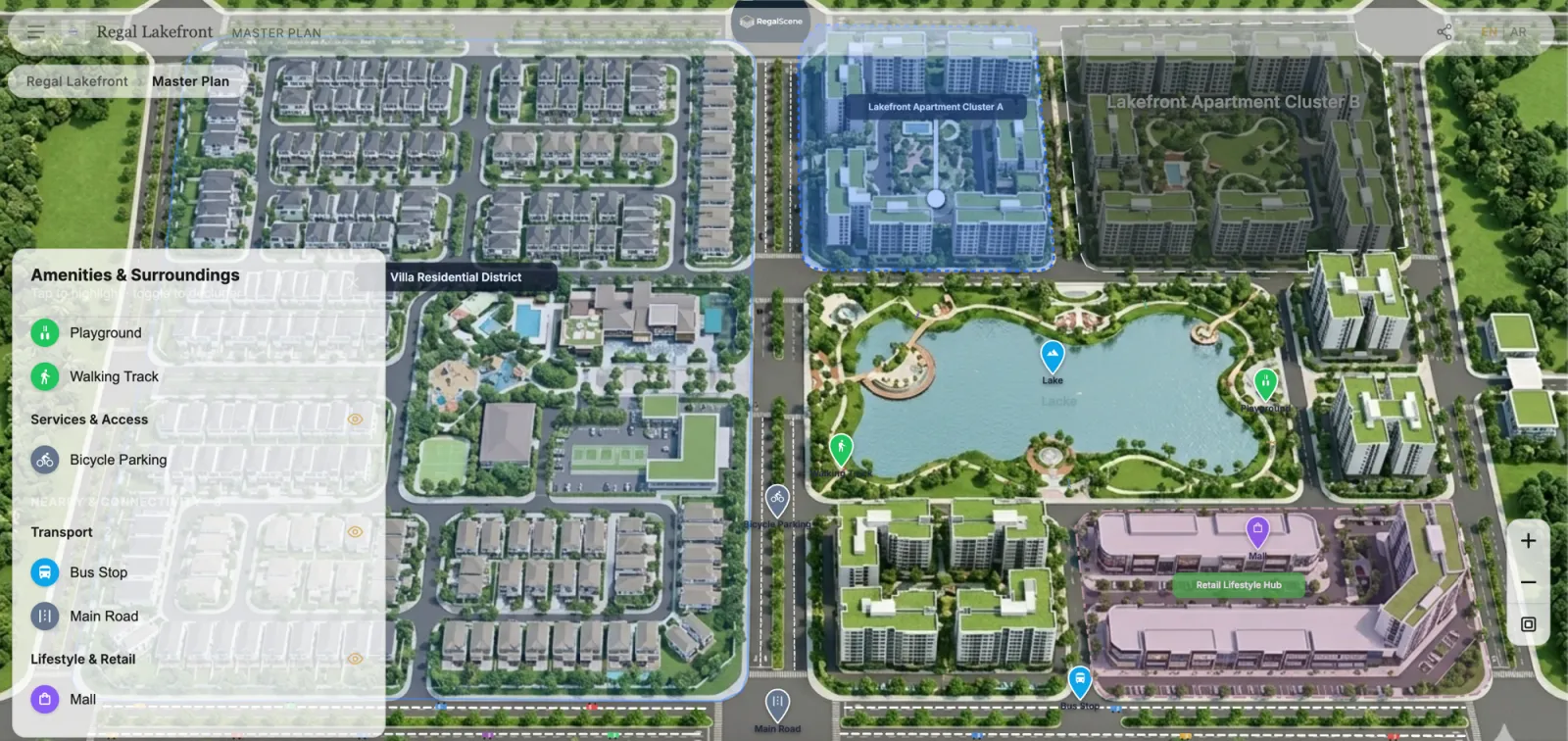
What is an interactive master plan?
An interactive master plan is a digital version of a property development's site plan that buyers can explore visually — zooming in, clicking on zones, navigating to buildings, and drilling down to individual floors and units. Unlike a static image or PDF, an interactive master plan responds to the buyer's actions and connects to live data like unit availability.
How does an interactive master plan work?
The starting point is a high-resolution site plan render — the kind that most developers already produce for marketing materials. This image is processed into tiled deep-zoom layers that load instantly at any scale, from the full development view down to individual building plots.
On top of the base image, interactive elements are added:
- Clickable zones that highlight when hovered and navigate to detailed views when clicked
- Hotspot markers that show building names, amenity labels, or navigation links
- SVG overlays that define precise boundaries for each plot, zone, or building footprint
- Status indicators that show availability — which zones have units for sale, which are sold out, which are coming soon
What can buyers do with an interactive master plan?
Explore at their own pace
Buyers zoom in and out, pan across the development, and click on areas that interest them — without waiting for a sales consultant to walk them through a physical model.
Navigate to detail
Clicking on a building zone navigates to that building's detailed view — a 360° exterior, a floor plan, or a unit selection interface. The master plan becomes the entry point to a deeper exploration journey.
Check availability
Color-coded overlays show which areas have available units. Buyers can focus their attention on zones and buildings that match their preferences.
Enquire in context
When a buyer clicks "register interest" or "request callback" from within the master plan, the system captures their exploration context — which zone, building, and view they were looking at.
Who uses interactive master plans?
- Residential community developers with large-scale townships and multiple building clusters
- Mixed-use developers with residential, retail, and commercial zones in one plan
- Villa compound developers with plot-level selection
- High-rise developers using the master plan to show the building's position relative to amenities and surroundings
Hotels and resorts apply the same idea to amenities, villas, and branded residences: see what an interactive hotel and resort master plan is.
What assets do you need?
Most developers already have what they need:
- A high-resolution site plan render (PNG or JPEG, typically produced by the marketing or design team)
- Optionally, an SVG file with zone or plot boundaries from the architectural drawing
No 3D models are required. No game engines. No VR headsets. The same visual assets that go into a brochure become the foundation of the interactive experience — see how developers use 3D renders as real estate marketing assets instead of static images.
How is it different from a virtual tour?
A virtual tour (360° walkthrough) shows what a space looks and feels like from inside. An interactive master plan shows the development's layout, structure, and organization from above — helping buyers understand where things are, what's available, and how the development fits together.
Both serve different purposes. An interactive master plan is the navigation layer. A virtual tour is the immersion layer. The best digital sales experiences connect both.
Once you're past the definition
If you already know what an interactive master plan is and you're now comparing how to build one, the practical questions change: which assets you hand over, how availability stays current, who updates it after launch, and what happens when phase two arrives. Our interactive master plan software page answers those as a product, including what RegalScene deliberately does not do.
Related reading:
- Interactive Master Plan Software for Property Developers
- Interactive Master Plan Benefits: What Property Developers Actually Gain
- Interactive Master Plan Example: Anatomy of a Real Project, Screen by Screen
- Interactive Master Plans for Property Launches
- 3D Rendering for Real Estate Marketing: Make the Renders You Already Paid For Sell Units
- Interactive Floor Plan Software: What Developers Should Look For
- What Is a Digital Sales Center for Real Estate?
Scene Engine powers interactive master plans with deep-zoom imagery, SVG overlays, and hotspot navigation. Learn more or book a demo.