Floor plans are one of the most viewed assets in any property sales experience. Buyers want to see the layout, understand the space, compare unit types, and check what's available.
But a static floor plan image — even a beautifully rendered one — doesn't help buyers do any of those things efficiently.
What makes a floor plan interactive?
An interactive floor plan goes beyond displaying an image. It turns the floor plan into a navigable, clickable, information-rich interface.
Clickable units
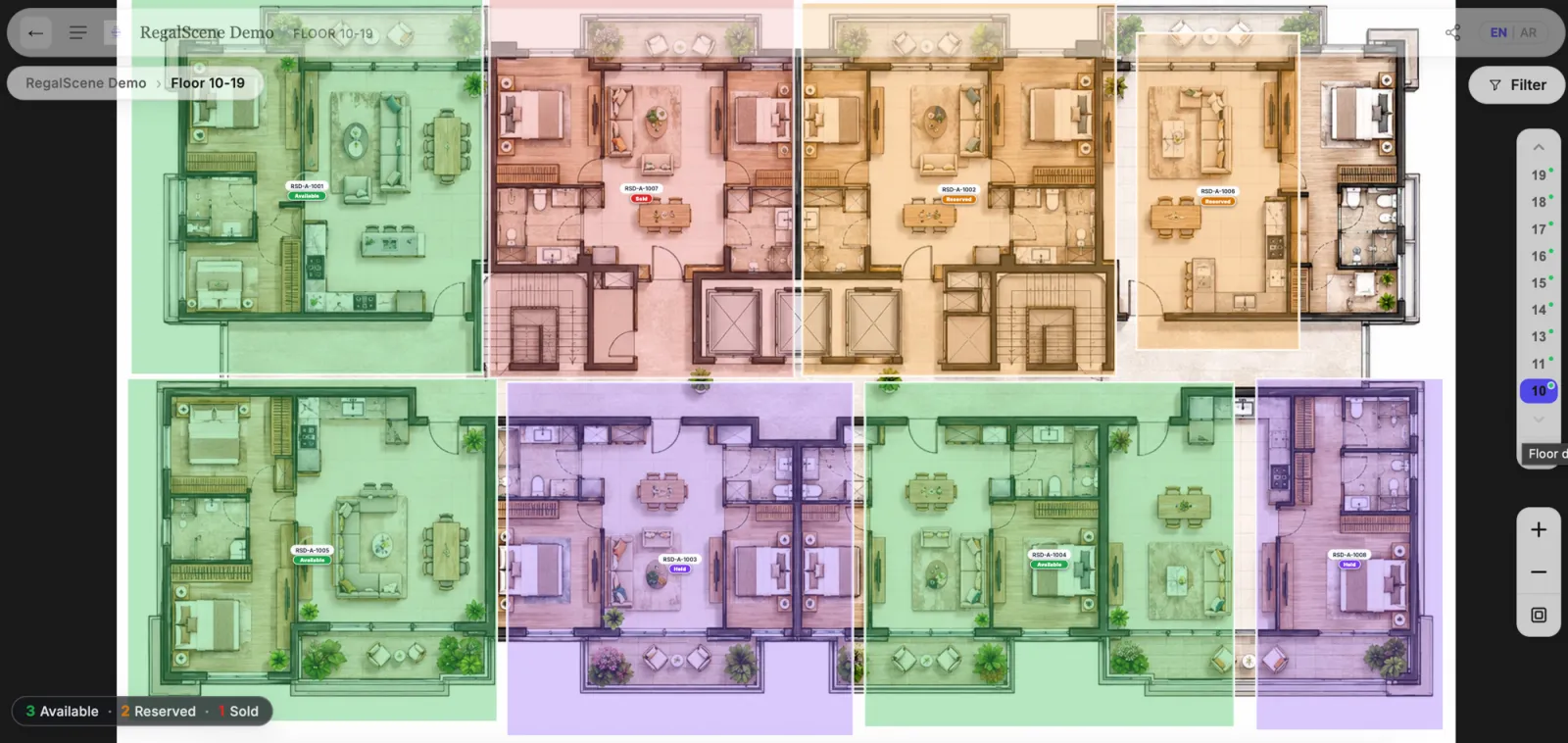
Each unit on the floor plan is a selectable element. Clicking on a unit shows its details — type, size, number of bedrooms, facing, and availability status.
Live availability
Unit status (available, reserved, sold) is displayed directly on the floor plan with color-coded overlays. Buyers can see at a glance which units are still available on any floor.
Floor-by-floor navigation
Buyers can switch between floors to compare the same unit position at different levels. This is especially important for high-rise developments where view and price vary significantly by floor.
Connected to the buyer journey
The floor plan isn't a standalone page — it's part of a connected navigation flow. Buyers arrive from the master plan or building view, explore the floor, select a unit, and enquire — all in one continuous experience.
Interactive floor plan software vs a floor plan creator
These sound alike and solve opposite problems. A floor plan creator — the kind architects, home designers, and DIY renovators search for — is a drafting tool: you draw walls, place doors, and produce a layout from scratch. RegalScene is not that, and interactive floor plan software in the sales sense is not either.
Interactive floor plan software for property sales starts from the floor plan you already have and makes it sell. Every unit becomes clickable, carries live availability, and connects up to the building and master plan and down to an enquiry. The job is not to draw a plan — it is to move a buyer from "which unit?" to "I want this one."
The quick test: if you need to create the drawing, you want a CAD or home-design tool. If you already have the drawing and need buyers to explore, compare, and enquire against live inventory, you want interactive floor plan software built for sales — the kind that lives inside a full property sales platform, not a standalone widget.
What to look for in floor plan software
Works with your existing assets
The best solutions work with floor plan images you already have — PNG, JPEG, or architectural SVG files. You shouldn't need to create 3D models or use specialized rendering software.
Supports SVG overlays
SVG overlays allow unit boundaries to be imported from architectural drawings with pixel-perfect accuracy. Each unit polygon becomes an interactive element with its own data and status.
No-code configuration
Sales and marketing teams should be able to update floor plans, change unit availability, and add or modify unit details without engineering support.
Part of a larger platform
Floor plan interactivity is most valuable when connected to a master plan, building views, lead capture, and analytics. A standalone floor plan widget misses the context that makes it useful.
Mobile-friendly
Buyers explore on mobile. Floor plan software must be responsive, with touch-friendly interactions and readable layouts on smaller screens.
What interactive floor plan software costs
Interactive floor plans are rarely priced as a standalone tool — they are one layer of a platform, so cost tracks the project rather than the floor plan alone. See how interactive master plan pricing works and what a virtual sales gallery costs for the common models — and why RegalScene prices by view, not per unit, so a floor with 8 units and a floor with 80 cost the same to publish.
Beyond the floor plan
An interactive floor plan is one layer of a complete digital sales experience. The most effective approach connects site plans, building views, floor plans, and unit details into a guided buyer journey — with lead capture and analytics throughout.
Related reading:
- Map, Building, Floor, and Unit Views: How to Display a Property Project Online
- Interactive Property Map for Real Estate Developers: The Complete Guide
- Best Virtual Tour Software for Property Developers in 2026: How to Choose
- Interactive Master Plans for Property Launches
- What to Look for in a Proptech Sales Platform
- Digital Property Sales in Southeast Asia
Scene Engine supports interactive floor plans with SVG overlays, live availability, and connected navigation. Learn more or book a demo.