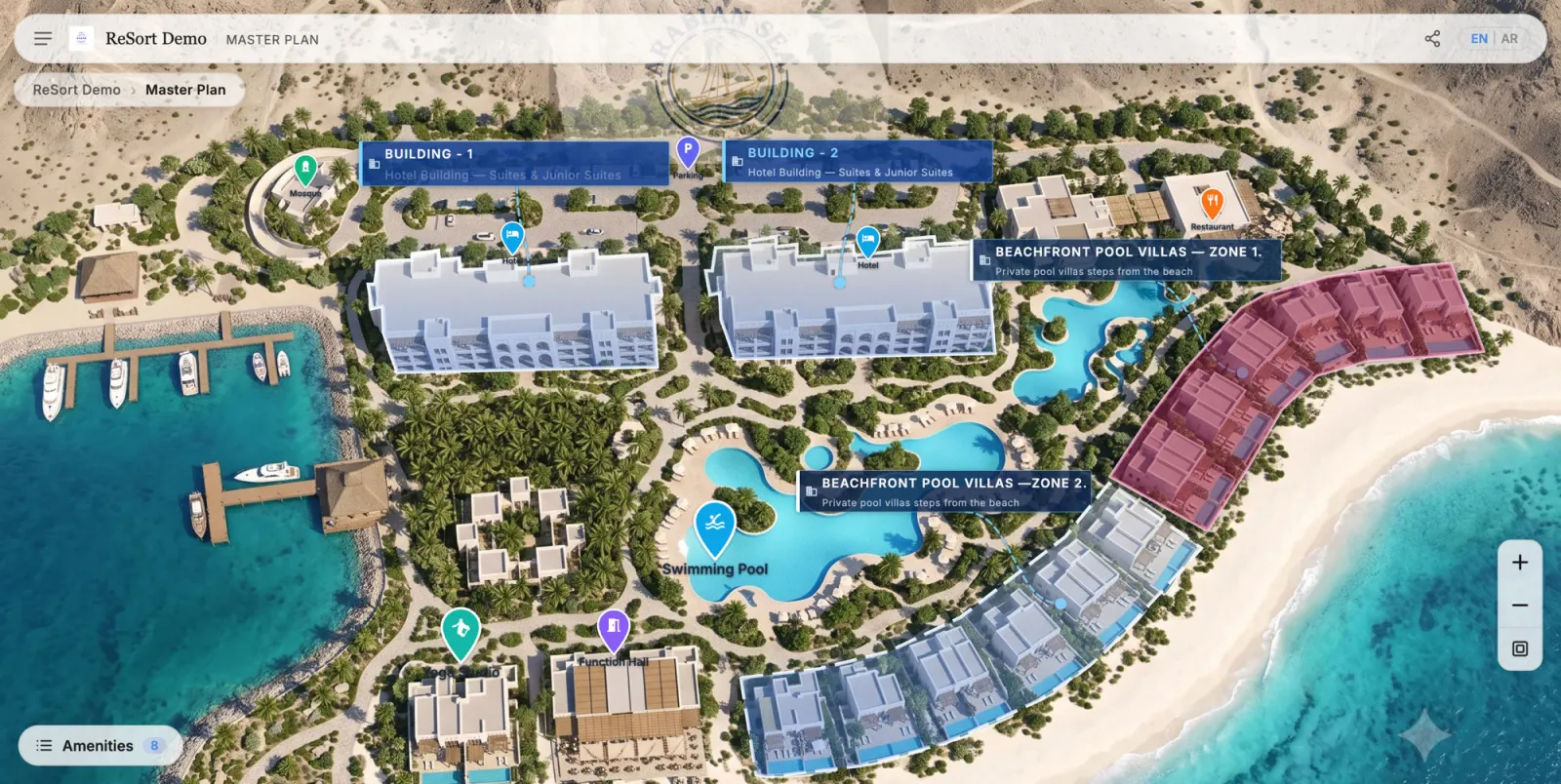
Every serious project launch already includes a significant 3D rendering budget: aerial master plan views, building exteriors, amenity views, interior CGI. Then, in most launches, those renders go into a PDF brochure, a hoarding, and a portal listing — static formats that can't answer a single buyer question or capture a single lead.
The highest-ROI move in property digital marketing usually isn't producing more assets. It's making the renders you already paid for interactive.
What a static render can't do
A beautiful aerial render of your master plan leaves the buyer alone with questions:
- Which of these buildings has available units?
- Where is the pool relative to Tower B?
- What's on the 12th floor? What does a type C look like?
- What would I pay, and who do I ask?
Every one of those questions currently routes to a salesperson — if the buyer bothers to ask at all. Most don't; they close the PDF and move to the next project.
The upgrade path: from render to interactive experience
The same assets, made navigable, answer those questions on their own:
1. Master plan render → interactive master plan
Your aerial render becomes a deep-zoom experience: buyers pan and zoom across the development, zones highlight on hover, and clicking a building navigates into it. Availability overlays show at a glance where units remain. No new rendering required — the existing high-resolution image is the foundation.
2. Building exterior renders → clickable building views
Facade and angle renders become a building explorer: buyers rotate between views, see floors, and select units directly on the facade. The renders your visualization studio delivered for the brochure become the unit-selection interface.
3. Interior CGI → rendered 360 tours
If your CGI package includes (or can include) 360 panoramas, they slot in at the unit level — immersion at the exact moment a buyer is shortlisting. If you're commissioning renders now, ask your studio for 360 panoramas of key unit types alongside the stills; the marginal cost is small while the 3D view is already built.
4. Floor plans → interactive unit selection
Static floor plates become clickable: each unit shows status, type, and orientation, and connects to its layout, gallery, and enquiry action.
Why this beats commissioning more renders
- The spend is already committed. Making renders interactive costs a fraction of producing them.
- Static renders depreciate; interactive ones compound. A brochure is finished the day availability changes. An interactive layer stays current through the whole sales cycle.
- Leads come with context. When enquiry happens inside the experience, you learn what the buyer explored — building, floor, unit, price interest — instead of receiving a bare phone number.
- One asset set, every channel. The same interactive experience embeds in your website, campaign landing pages, agency microsites, and sales gallery screens.
What to ask your visualization studio (before the next project)
- Deliver the master plan aerial at full resolution, not just web-compressed.
- Provide zone and plot boundaries as SVG or vector overlays from the drawing set — it makes the interactive layer precise.
- Add 360 panoramas of hero unit types to the package.
- Keep consistent camera angles across building views so they chain into a rotation.
None of this increases render cost meaningfully — it just makes the deliverables interactive-ready.
Related reading:
- Interactive Experiences vs 3D Renders: What Actually Generates Leads
- 3D Rendering for Hotel and Resort Marketing
- Virtual Tour vs 3D Render vs Interactive Master Plan: Which Sells Property Better?
- What Is an Interactive Master Plan?
- Why Static Brochures Are No Longer Enough for Property Launches
RegalScene is built to run on the renders you already have — master plans, building views, floor plans — turning them into an interactive sales experience with current inventory and contextual leads. Book a demo.