A buyer exploring a new development rarely falls in love with one unit immediately. More often, they narrow down to a shortlist — two, three, maybe four options — and then need to compare them before making a decision.
In a physical sales gallery, this comparison happens naturally. The sales agent pulls out floor plans, lays them side by side, and walks the buyer through the differences. Size, layout, view, floor level, price — the buyer sees everything at once and can make a decision.
Online, this comparison step is where most digital sales experiences break down.
The comparison gap in digital property sales
When a buyer explores a development online — through a website, a digital brochure, or even an interactive master plan — the journey typically follows a linear path. They look at one unit, note the details, go back, look at another unit, try to remember the first one, maybe screenshot the floor plan, then look at a third option.
By the time they've explored four units, they're juggling details across browser tabs, screenshots, and mental notes. The experience is fragmented, and the buyer's momentum slows.
At this point, one of two things happens:
- The buyer drops off. The comparison is too much effort. They'll "come back later" — and often don't.
- The buyer contacts an agent. They ask the agent to send details for all four units so they can compare. The agent sends PDFs or screenshots via WhatsApp. The comparison happens outside the digital experience, and the developer loses visibility into what the buyer is evaluating.
Neither outcome is ideal for the developer or the buyer.
What a built-in comparison tool does
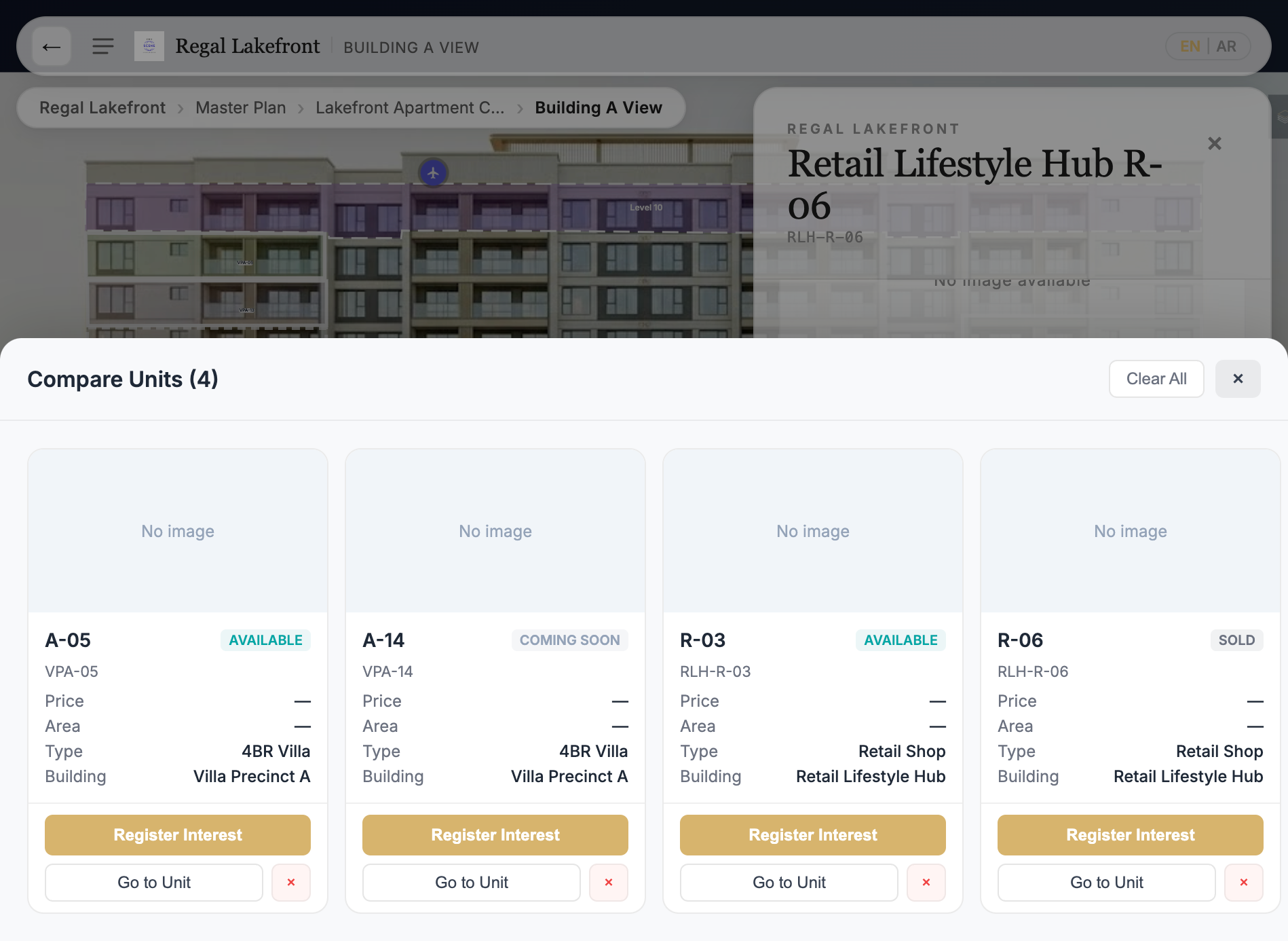
A unit comparison feature within the interactive sales experience lets buyers select multiple units as they explore and view them side by side — without leaving the experience.
The buyer clicks on a unit in the master plan, floor plan, or building explorer, adds it to their comparison list, continues exploring, adds another unit, and when ready, opens the comparison view to see all selected units in a single panel.
What the comparison shows
A practical comparison view presents the key decision-making fields for each unit:
- Unit code and location — which building, which floor
- Unit type — 1 bedroom, 2 bedroom, 3 bedroom, studio, villa, retail shop
- Size — built-up area in square metres or square feet
- Price — if the developer has enabled price visibility
- Status — available, reserved, coming soon, sold
- Building or precinct — for large developments with multiple buildings
- Floor plan thumbnail — if available
The buyer sees everything at a glance. No switching between pages, no screenshots, no mental arithmetic.
Actions per unit
Each unit in the comparison view should have its own action buttons:
- Register Interest — submit an enquiry for that specific unit
- Go to Unit — jump back to the unit's location in the interactive experience
- Book a Viewing — schedule a visit or virtual tour
- Share Unit — send the unit details to someone else
This means the comparison isn't just a passive display — it's an active decision point. The buyer can compare, decide, and act from the same screen.
Why this matters for different property types
Residential apartments and condominiums
High-rise developments may have eight or more unit types per floor, spread across multiple towers. A buyer might be comparing a 2-bedroom corner unit on level 15 of Tower A with a 2-bedroom standard unit on level 20 of Tower B. The comparison tool helps them see the trade-offs — layout vs floor level vs price vs view direction.
Villas and landed homes
Township developments with villa precincts offer different lot sizes, orientations, and locations within the community. A buyer comparing a corner villa near the lake with an interior villa near the clubhouse needs to see the differences in size, price, and position clearly.
Mixed-use developments
In mixed-use projects, a buyer might be comparing residential units with each other, or an investor might be comparing retail lots. The comparison tool works the same way regardless of the asset type — it presents the relevant fields for each item side by side.
Commercial and industrial
For logistics parks, industrial zones, and commercial developments, the comparison works for warehouses, land plots, office suites, and retail spaces. An investor comparing three warehouse units wants to see clear height, loading docks, floor area, and lease terms side by side.
The impact on sales operations
Buyers stay in the experience longer
When comparison is easy, buyers don't need to leave the digital experience to evaluate their options. They explore, shortlist, compare, and enquire — all within the same session. This keeps the buyer engaged and gives the developer a complete picture of the buyer's journey.
Leads arrive with comparison context
When a buyer submits an enquiry from the comparison view, the sales team knows not just which unit the buyer enquired about — they know which other units the buyer was comparing. This context helps the agent prepare a more relevant response.
For example, if a buyer enquired about Unit A-1503 but was also comparing B-2001 and C-1205, the agent knows the buyer is considering multiple buildings and different floor levels. The follow-up conversation can address the specific trade-offs the buyer is weighing.
Fewer back-and-forth messages
Without a comparison tool, buyers contact agents to request details about multiple units. The agent sends PDFs, the buyer asks follow-up questions, and the process takes several messages before the buyer has enough information to decide.
With comparison built into the experience, the buyer self-serves the information they need. When they do contact the agent, the conversation starts at a more advanced stage — they've already evaluated the options and have specific questions rather than broad requests.
Better conversion from exploration to enquiry
The comparison step is often the last step before an enquiry. A buyer who has selected, compared, and evaluated units is more likely to submit an enquiry than a buyer who is still browsing casually. Making comparison easy and immediate removes a friction point in the conversion path.
What makes a good comparison experience
Not all comparison tools are equally useful. A good property comparison experience should be:
Accessible from anywhere in the journey. The buyer should be able to add a unit to their comparison from the master plan, the building view, the floor plan, or the unit detail panel — not just from a separate "search" page.
Persistent across navigation. If a buyer adds a unit to their comparison, navigates to a different building, and adds another unit, the first selection should still be there. The comparison list should persist as the buyer explores.
Limited to a practical number. Comparing two to four units is useful. Comparing eight is overwhelming. A practical limit — typically four — keeps the comparison view clean and readable.
Clear on status. Each unit should clearly show its current availability status. There's no value in comparing a unit that's already sold or reserved.
Action-oriented. The comparison should lead to action — an enquiry, a booking, or a share. It's a decision-making tool, not just an information display.
Getting started
For developers who already have an interactive master plan or building explorer, adding comparison is a natural next step. The unit data already exists in the inventory system. The interactive overlays already link to individual units. The comparison feature connects these elements into a side-by-side view that helps buyers decide.
Platforms like RegalScene include unit comparison as part of the interactive sales experience — allowing buyers to select, compare, and enquire from within the same visual journey, across any device.
Related reading:
- From Lead to Unit Selection: Improving the Online Property Buying Journey
- Why Real Estate Developers Need a Visual Inventory Layer, Not Just a CMS
- Interactive Master Plans for Asian Property Sales
RegalScene helps property developers create interactive sales experiences with built-in unit comparison, inventory visibility, and contextual lead capture. Learn more or get in touch.