Most property developers have a CMS. Many have an inventory management system. Some have both, plus a CRM, a marketing automation tool, and a listing portal integration.
But when a buyer lands on the developer's website and asks "What's available in Building C, facing the lake, on a high floor?" — none of these systems can answer that question visually.
The data exists. The unit is in the inventory system. The floor plan is in the CMS. The availability status is in the sales spreadsheet. But the buyer has no way to discover this information through a visual, spatial experience that mirrors how they actually think about property.
This is the gap that a visual inventory layer fills.
The difference between data and experience
What a CMS does
A content management system stores and serves content — project descriptions, images, brochures, news articles, agent profiles. It's designed for pages and posts, not for spatial relationships between buildings, floors, and units.
A CMS can tell you that "Unit B-12-03 is a 2-bedroom apartment." It can show you a photo and a PDF floor plan. But it can't show you where that unit sits within the building, what it faces, or how it relates to the pool, the entrance, or the neighbouring block.
What an inventory system does
An inventory or unit management system tracks unit data — codes, types, sizes, prices, statuses, attributes. It's designed for operations: which units are available, which are reserved, which are sold, what the revenue pipeline looks like.
An inventory system can tell the sales team that 47 units are available in Phase 2. But it can't help a buyer visually explore those 47 units in context — on a floor plan, within a building, within the master plan.
What a visual inventory layer does
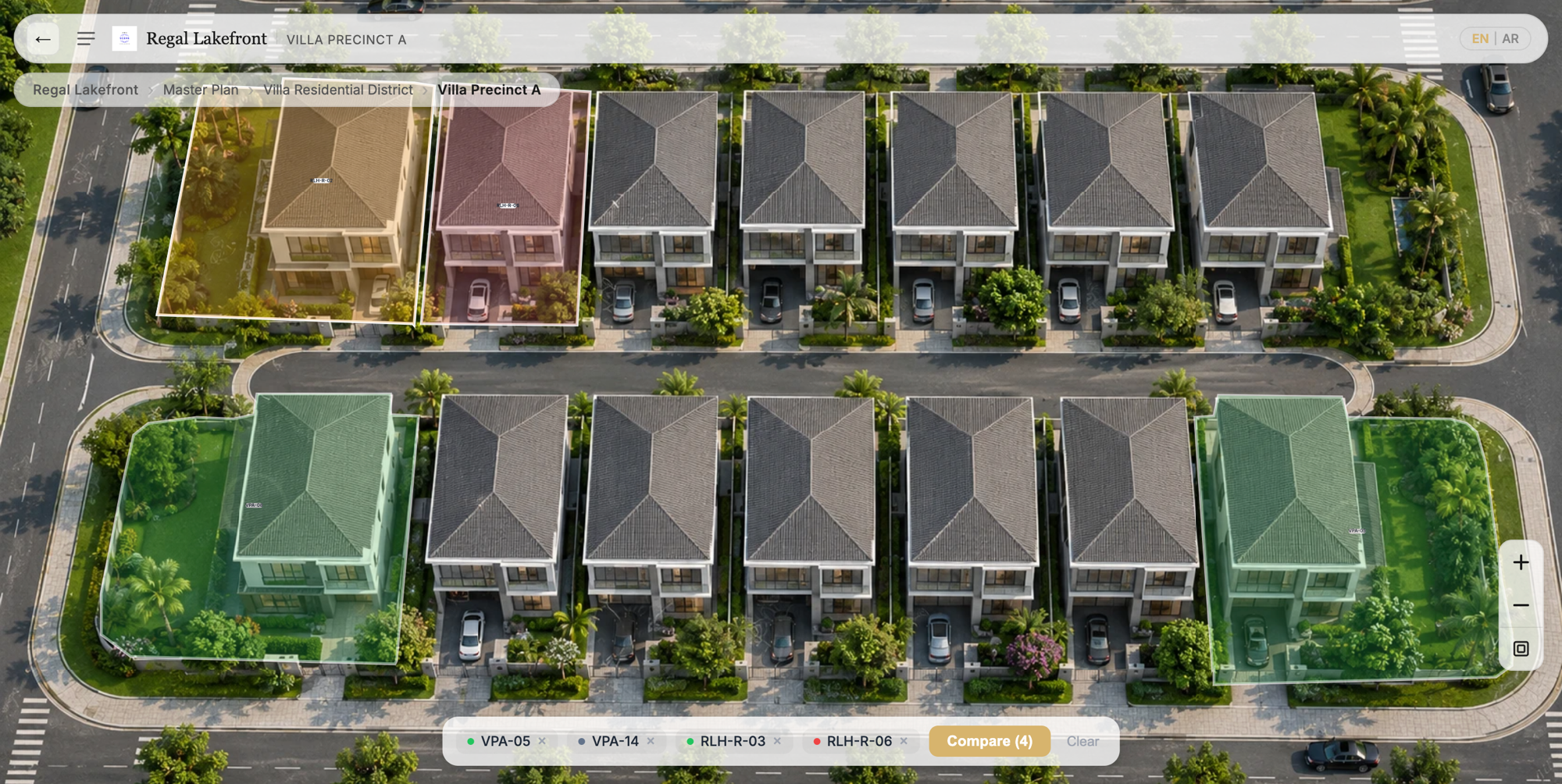
A visual inventory layer sits on top of both. It takes the data from the inventory system and the content from the CMS, and presents it through an interactive visual experience — master plans, building explorers, floor plans, and unit-level detail panels.
The buyer sees a master plan, clicks on a building, selects a floor, sees which units are available (colour-coded by status), clicks on a unit, and sees the floor plan, size, price, and a button to enquire or book a viewing. The journey is visual, spatial, and intuitive.
The sales team sees the same data, but from an admin perspective — managing which overlays are linked to which units, updating availability in real time, and receiving leads with full spatial context.
Why flat data doesn't work for property
Property is inherently spatial. Buyers don't think in spreadsheet rows. They think in terms of:
- Where is this unit? — which building, which floor, which wing
- What does it face? — lake view, city view, garden view, internal facing
- What's nearby? — pool, gym, parking entrance, main road, MRT station
- How does it compare? — this unit vs. the one two floors up, or the one in the adjacent tower
- What's the overall vibe? — is this a dense urban project or a spacious township?
These are spatial questions. They can only be answered visually, not through text descriptions or data tables.
The practical gap in most developer stacks
Here's what typically happens when a developer launches a project:
- Marketing team creates a website with a CMS — project description, image gallery, location map, brochure download.
- Sales team manages inventory in Excel or a property management system — unit codes, statuses, prices.
- Buyer visits the website, downloads a brochure, maybe browses a gallery. If interested, they fill out a contact form or message an agent on WhatsApp.
- Agent receives the enquiry with no context about what the buyer explored. They send a PDF floor plan and an availability list. The conversation starts from scratch.
The gap: there's no visual layer connecting the marketing content, the inventory data, and the buyer's exploration journey.
What the visual layer enables
For buyers
- Self-service exploration. Buyers can navigate from master plan to building to floor to unit at their own pace, without waiting for an agent to send materials.
- Real-time availability. Instead of asking "Is this unit still available?", buyers see live status directly on the visual — available, reserved, or sold.
- Contextual understanding. Buyers see the unit in context — its position within the floor, the floor within the building, the building within the community.
- Comparison. Side-by-side comparison of units with different floor plans, sizes, and views becomes natural when the data is visual.
For sales teams
- Qualified leads. Every enquiry includes what the buyer explored — which project, building, floor, unit, and what action they wanted.
- Reduced back-and-forth. Buyers arrive at the conversation already informed about the project, reducing the time needed for basic information sharing.
- Consistent experience. Every buyer gets the same professional visual presentation, regardless of which agent they're connected to.
- Live inventory updates. Status changes in the inventory system are reflected immediately on the visual experience — no manual PDF updates required.
For management
- Sales visibility. Interactive analytics show which buildings get the most views, which units get the most interest, and where buyers drop off.
- Faster launches. New phases or buildings can be added to the visual experience without rebuilding the website.
- Multi-channel distribution. The same visual experience can be embedded on the developer's website, shared via agent links, or displayed in physical sales galleries.
Examples across Asia
Master-planned townships
Developers in Malaysia, Indonesia, and Vietnam launching large-scale townships with multiple phases often struggle to communicate the full scope of the development. A visual inventory layer turns the master plan into a navigable experience where each phase, zone, and building is clickable and connected to live inventory data.
Urban high-rise projects
In dense city markets like Singapore, Bangkok, and Kuala Lumpur, high-rise developers need buyers to understand vertical positioning — floor levels, views, unit orientations. A visual inventory layer maps availability onto a building cross-section or floor-by-floor explorer, making vertical navigation intuitive.
Industrial and commercial developments
Beyond residential, logistics parks, industrial zones, and commercial developments across the region use visual inventory layers to showcase available land plots, warehouse units, and office suites — each linked to specifications, pricing, and enquiry forms.
Cross-border sales
For projects targeting overseas buyers — Malaysian properties sold in Singapore, Thai properties marketed in China, Indonesian developments attracting Middle Eastern investors — the visual experience serves as the primary sales tool, operating 24/7 across time zones without requiring a physical gallery visit.
Not a replacement, but a layer
The visual inventory layer doesn't replace the CMS, the inventory system, or the CRM. It connects them.
- The CMS continues to manage marketing content and SEO pages.
- The inventory system continues to be the source of truth for unit data and availability.
- The CRM continues to manage the sales pipeline and agent workflows.
- The visual layer sits in front of all three, translating data into a buyer-facing exploration experience and feeding qualified leads back into the sales process.
This architecture means developers don't need to rip out existing tools. They add the visual layer as the experience front-end, connected to the data they already have.
Getting started
The practical path to adding a visual inventory layer is:
- Start with the master plan. Map the interactive areas on a high-resolution render or aerial image.
- Connect inventory. Link units to the visual overlay so availability is reflected in real time.
- Add lead capture. Embed enquiry forms at the building, floor, and unit level.
- Publish and distribute. Share the experience on the developer's website, through agent links, and in sales gallery displays.
Platforms like RegalScene are purpose-built for this workflow — enabling developers to create, manage, and publish interactive visual sales experiences without custom development.
Related reading:
- Interactive Master Plans for Asian Property Sales
- From Lead to Unit Selection: Improving the Online Property Buying Journey
- How Developers Can Sell Through Multiple Brokerages Without Losing Control
RegalScene is the visual inventory layer for real estate developers. Create interactive master plans, connect your inventory, and capture qualified leads — all from one platform. Learn more or get in touch.