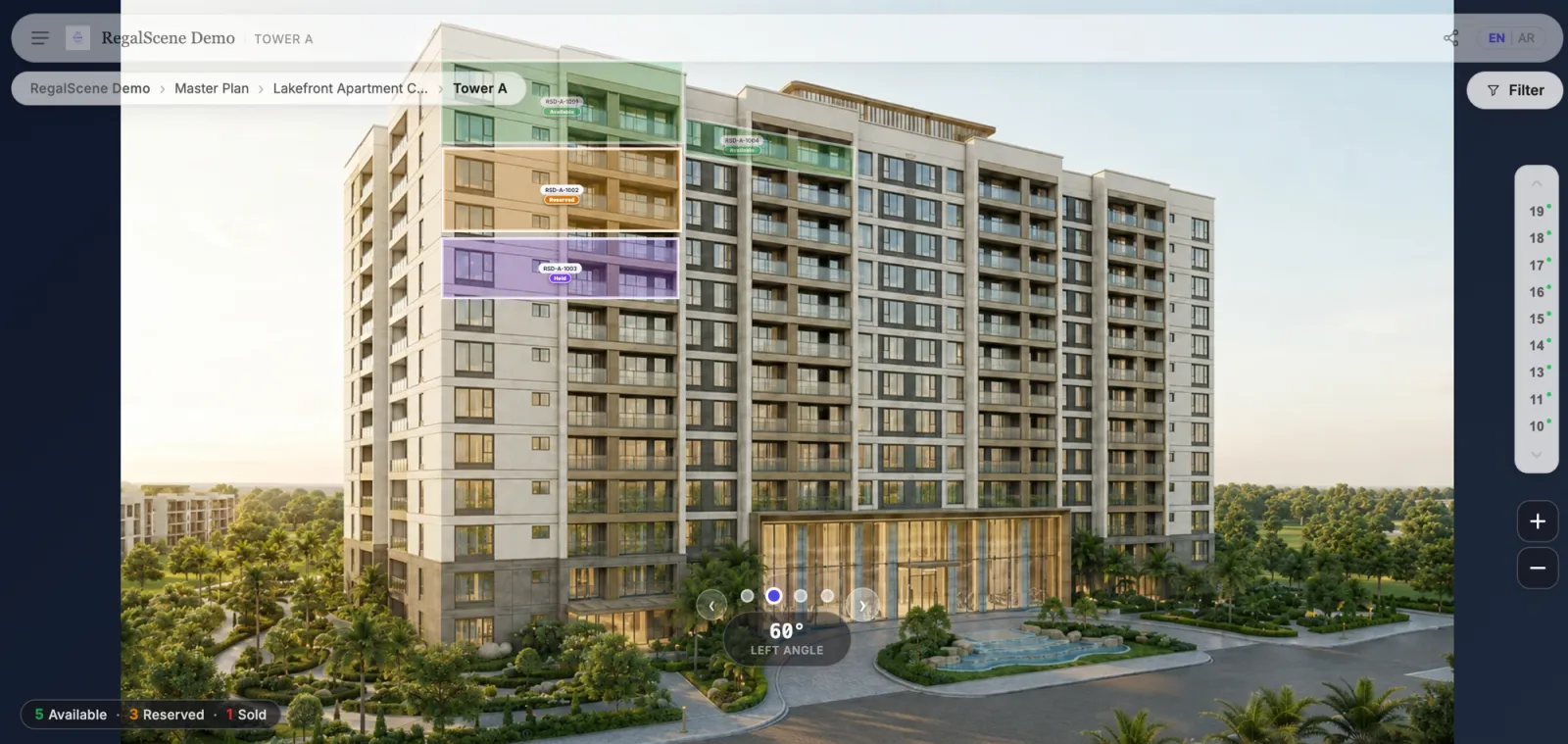
What is a 360° building explorer?
A 360° building explorer is an interactive view of a single tower or building that buyers can rotate, zoom into, and inspect from every angle. Instead of a single marketing render, buyers see the building from the front, the sides, and the rear — and every apartment on the facade becomes a clickable, status-aware hotspot.
Where an interactive master plan shows where a building sits in the development, the building explorer shows what the building is and which units are available on it.
How does a 360° building explorer work?
The starting point is a set of high-resolution exterior renders taken at different angles — the same renders developers already commission for their marketing. These angles are sequenced so buyers can rotate smoothly between them, from a 0° front view to 30°, 120°, and beyond.
On top of each angle, interactive elements are added:
- Unit hotspots mapped directly onto individual apartments on the facade
- Current status on each unit — available, reserved, held, or sold — kept current by your sales team
- Navigation links back to the master plan or down into a floor plan and unit detail
- Angle controls so buyers can rotate the tower and inspect it from any side
What can buyers do with it?
Rotate the building
Buyers turn the tower through a full sequence of angles to understand its orientation, which units face the pool or the city, and how it looks in context.
Zoom into the facade
Deep-zoom lets buyers move from the whole tower down to a single balcony — reading the architecture the way they would standing in front of it.
See availability on the building itself
Every apartment is color-coded by current status, painted onto the render. Buyers instantly see what is on the market on each floor, without a separate price list.
Select and enquire in context
Tapping a unit opens its price, layout, and area — then a callback, WhatsApp message, or reservation. The enquiry arrives tied to that exact unit and view.
Where it fits in the buyer journey
The building explorer is the middle layer of a connected journey: the master plan orients the buyer, the building explorer lets them choose a tower and a unit, and the floor plan and unit detail close the decision. Buyers move through all three at their own pace — on a gallery touchscreen or on their own phone at home.
What assets do you need?
Most developers already have them:
- A set of exterior renders of the building at several angles (PNG or JPEG)
- Optionally, unit boundary data so hotspots align precisely to each apartment
No 3D model, game engine, or VR headset is required. The renders that go into a brochure become the foundation of the interactive building — the same principle behind turning 3D renders into real estate marketing experiences.
360° explorer vs. virtual tour vs. single render
A single render is a static picture. A virtual tour walks you inside a space. A 360° building explorer sits between them: it shows the whole building from the outside, from every angle, with current availability and unit selection built in. It is the navigation and decision layer for a specific tower — not just an image, and not an interior walkthrough. If you're evaluating tools for either layer, our guide to choosing virtual tour software as a property developer covers what actually matters.
Related reading:
- Best Virtual Tour Software for Property Developers in 2026: How to Choose
- What Is an Interactive Master Plan?
- Interactive Floor Plan Software: What Developers Should Look For
- How Unit Comparison Helps Property Buyers Make Faster Decisions
- Interactive Discovery for Penang Waterfront & High-Rise
- Interactive Master Plans for Abu Dhabi Waterfront
Scene Engine powers 360° building explorers with multi-angle renders, unit hotspots, and current availability. Learn more or book a demo.