Interactive master plan software

Interactive Master Plan Software
for Property Developers

Your master plan is already the strongest sales asset you own. RegalScene makes it clickable, so buyers move from the plan to a precinct, a building, a floor, and a unit with live availability, then enquire from the unit they picked.

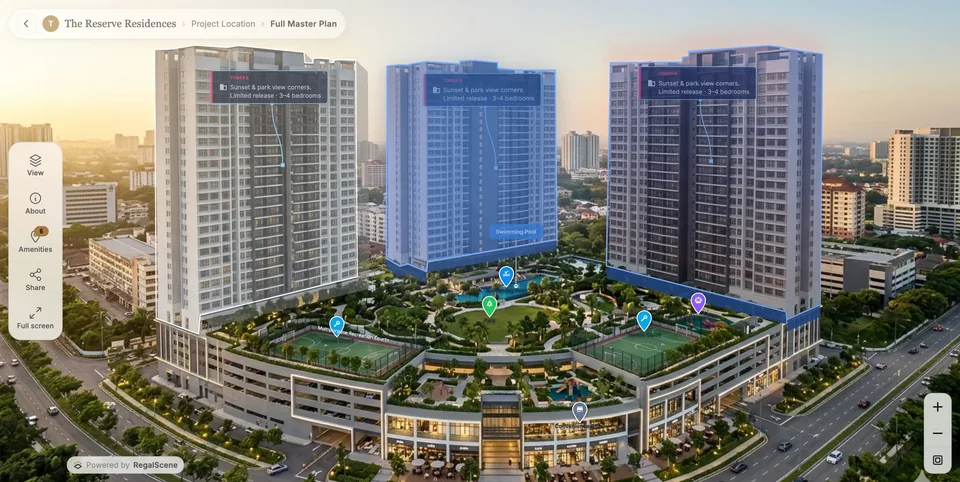
An interactive master plan in RegalScene with clickable buildings, zones, and amenity points of interest

A live RegalScene master plan. Amenities, zones, and buildings are clickable, and every unit behind them carries a real status.

The category

What interactive master plan software does

An interactive master plan is your development’s site plan turned into something a buyer can use: they zoom across the project, click a precinct, open a building, choose a floor, and land on a unit with its current status and price.

The software is the part that makes that possible. A render is an image, so it ends the conversation at “looks nice.” A platform connects the plan to your unit inventory, carries the buyer forward one decision at a time, and captures the enquiry at the moment they choose something concrete.

A static plan shows the development. Interactive master plan software sells a unit inside it.

Master planPrecinctBuildingFloorUnitEnquiry

For the plain definition and how the deep-zoom tiling works, read what an interactive master plan is. If you are still separating the terms, the site plan vs master plan vs property map comparison sorts them out.

The problem

Why static master plans lose the buyer

Not because they look bad. Because they cannot do anything once the buyer has a question.

A PDF cannot answer a question

Which building has three-bedroom units facing the park? Is anything left in phase two? Every question like that goes to your sales team, one call at a time. Most buyers never make the call.

Phase microsites drift apart

A separate site per launch means separate availability, separate branding, and separate analytics. Buyers see a fragmented development, and your team maintains four things instead of one.

Availability is stale the day it ships

Print and PDF freeze at the moment they are exported. A buyer falling for a unit that sold three weeks ago costs you trust that no amount of media spend buys back.

Enquiries arrive without context

A contact form tells you someone exists. It does not tell you which tower, which floor, or which layout they were looking at when they decided to act.

The full argument, with the sales-pipeline consequences, is in why static brochures fail.

The platform

How RegalScene builds an interactive master plan

Eight pieces, on one platform, from the assets your project already produced.

Master plan scenes

The master plan render you already commissioned becomes a deep-zoom scene that stays sharp from the whole development down to a single plot. Large plans stay fast in a browser.

How large plans stay fast

Clickable zones, buildings, and precincts

Precise boundaries are drawn over the artwork, with labels, hover states, and amenity points of interest. Each one is a doorway further into the project.

Live unit availability

Status comes from the unit inventory your team maintains, not from the artwork. Update a unit once and every scene that shows it reflects the change.

Filters on the plan itself

Buyers filter by availability, bedrooms, unit type, floor, and price range. Matching units stay lit while the rest fade back, so the answer is visual rather than a list.

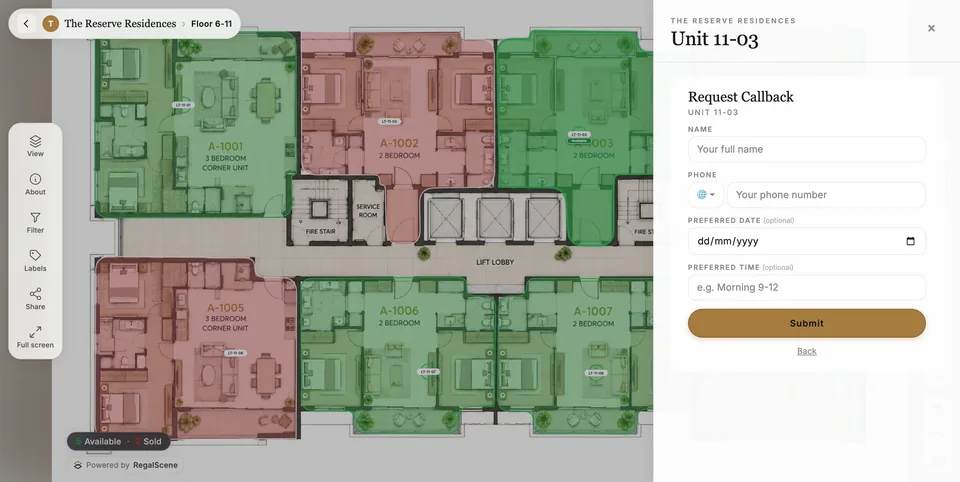
Unit-level enquiry

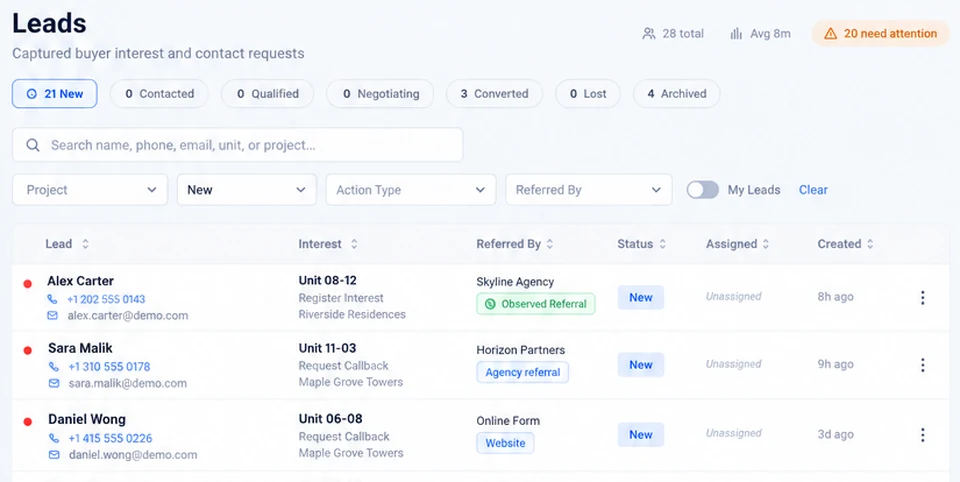
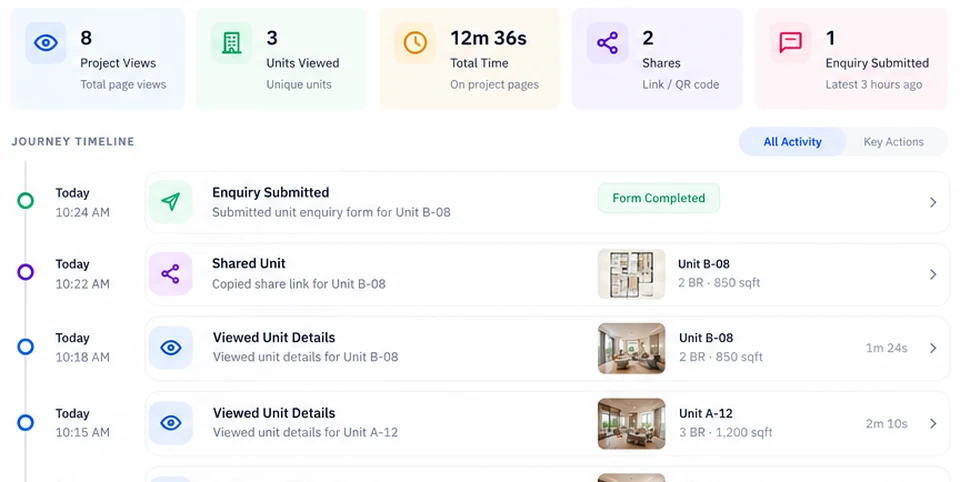
Register interest, request a callback, or open WhatsApp from the exact unit on screen. The enquiry carries the project, building, floor, unit, and price the buyer saw.

Lead Engine

Sharing that lands where you left off

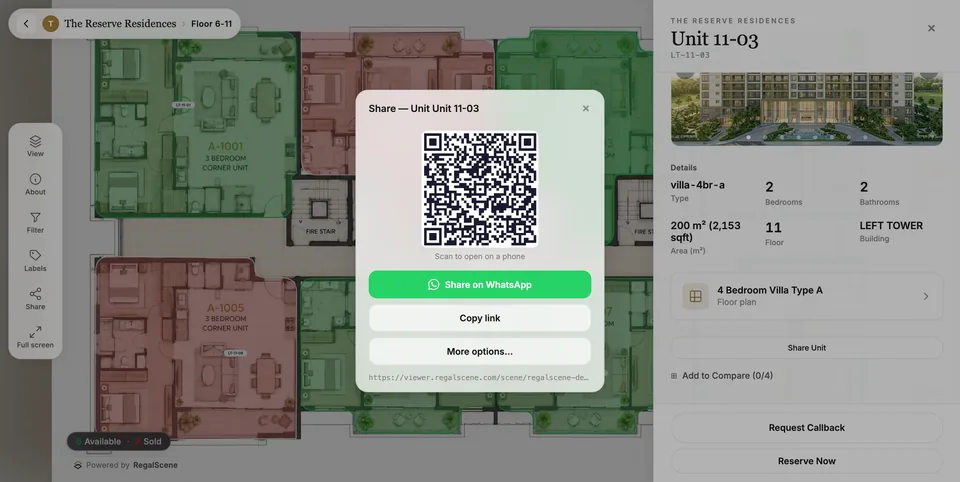
Every level is a link: QR codes for hoardings, events, and print, and WhatsApp for the conversations buyers are already having. The recipient arrives exactly where the sender was standing.

Shareable links and QR codes

Updates without going back to a vendor

Scene, label, media, and inventory changes are published under version control, so a new phase or a price change does not become a change order. Access to the more advanced authoring tools depends on your plan.

Studio

Buyer intent analytics

See which precincts, buildings, floors, and unit types buyers explore, and which CTAs, campaigns, and agent links the enquiries came through.

Insight Engine

The interactive master plan is one scene type inside Scene Engine, which sits in the wider property sales platform alongside Studio, Lead Engine, and Insight Engine.

The buyer journey

From the master plan to a signed enquiry

These are live product screens, not mockups. The screen-by-screen walkthrough is in the anatomy of a real experience.

Step 1

Start at the master plan

Buyers arrive at the whole development: precincts, phases, amenities, and roads. They pan, zoom, and pick the part that interests them instead of scrolling a brochure someone else sequenced.

Interactive township master plan with clickable zones and amenity labels

Step 2

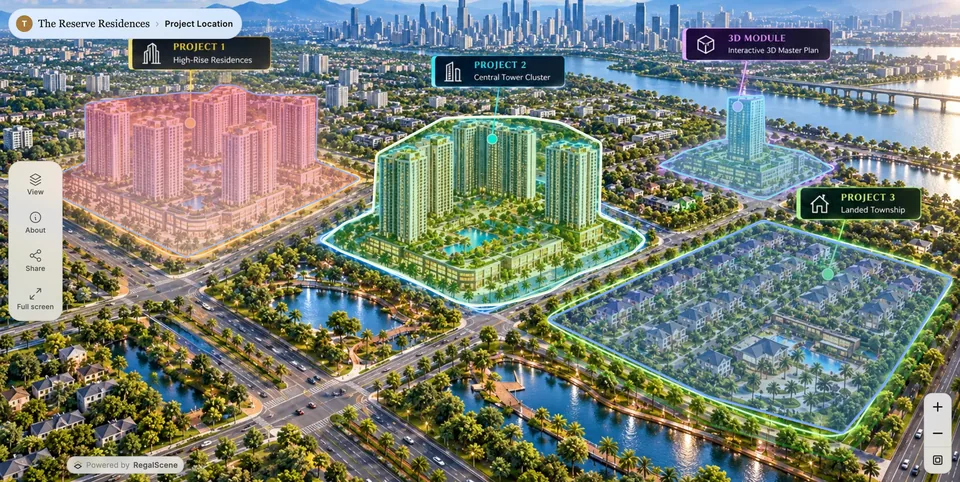
Open a precinct, or another project entirely

One master plan can hold several projects, phases, or towers. A mixed-use destination and a developer's whole portfolio both work as a single entry point, and the buyer moves between them without leaving the experience.

Multi-project portfolio map opening into several developments from one master plan

Step 3

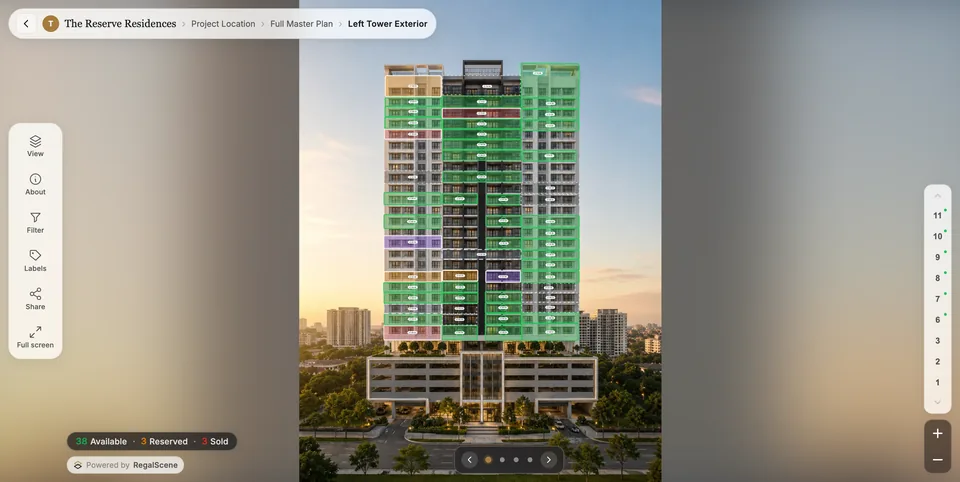
Filter units on the building itself

The facade carries live status. Buyers filter by availability, bedrooms, unit type, and price, and the matching units stay lit on the building while the rest recede.

Building view with live unit availability and a visual filter panel

Step 4

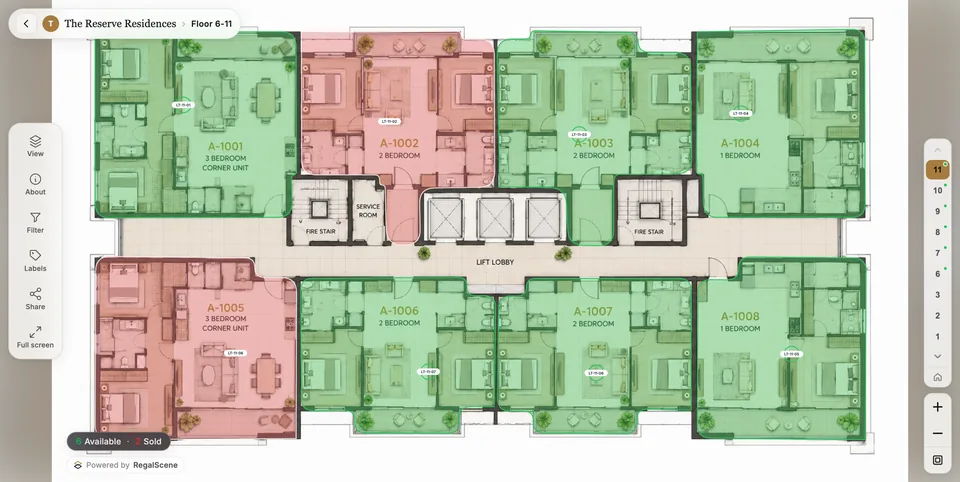
Check the floor and compare the layout

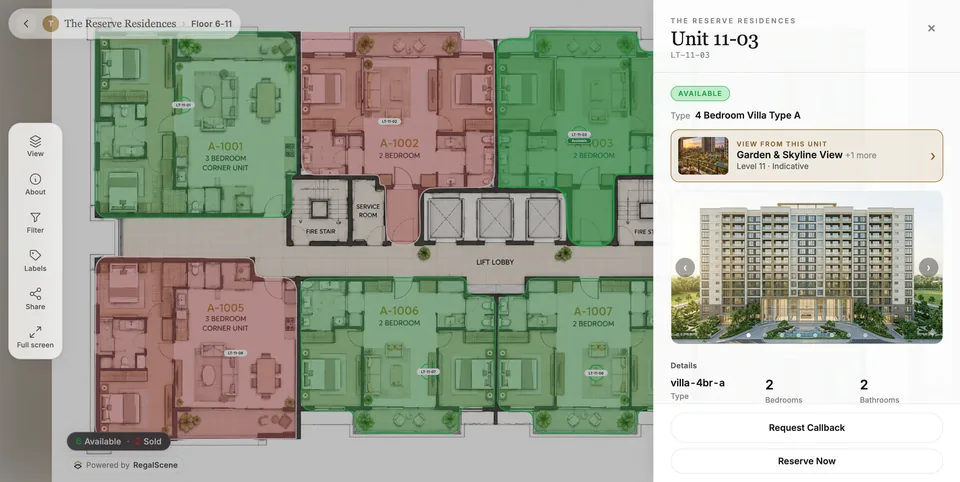
Floor plans carry per-unit status, so “is there a corner unit free higher up?” becomes a two-tap question rather than a phone call.

Interactive floor plan with every unit colored by live availability

Step 5

Enquire from the unit, in context

The enquiry opens from the unit the buyer chose and carries its building, floor, layout, and the price they saw. Your team picks up a follow-up rather than starting a discovery call.

Unit enquiry card with price and WhatsApp lead capture actions

2D · 3D · 360°

One journey, the right visual at each step

A development does not have to become a heavy 3D build to be interactive. A 2D master plan can lead into a 3D building, then a floor plan, then a unit. Another project might go from the master plan straight to a 360° view and an enquiry.

However the buyer reaches a unit, the availability, price, details, and enquiry behave the same way, because it is one platform rather than separate products bolted together.

2D master plans and site plans

The default, and usually the right one. A high-resolution render becomes a deep-zoom plan that loads on a mid-range phone over mobile data.

Floor plans and stacking plans

Per-unit status on the floor plate, plus a floor rail so buyers can move up and down a tower without going back to the building view.

360° building views

Rotate a tower through captured angles to see orientation, views, and which side a unit faces. No headset, no download.

3D models you already have

Bring an existing model and link its units to the same live inventory. 3D is one renderer inside the journey, not a separate product.

How interactive 3D models fit the journey →
A 3D building model in RegalScene with clickable units carrying live availability

Where it is used

Every development with something to navigate

The master plan earns its keep when there are zones, buildings, or phases between the buyer and a unit, and availability that moves.

Townships and master-planned communities

Multi-phase land developments where precincts, villa clusters, and amenities all need to be navigable before a single unit is chosen.

Townships and mixed-use

Mixed-use developments

Residential, retail, office, and hospitality on one plan, each with its own inventory rules and its own audience arriving through the same front door.

Multi-tower high-rise projects

Several towers, hundreds of units, and availability that moves weekly. The plan routes buyers to a tower, a floor, and a stack without a sales consultant in the loop.

Waterfront and resort communities

Frontage, orientation, and proximity to the water carry the price. Buyers need to see position on the plan, not read it in a table.

Free zones, logistics, and commercial land

Land plots, ready-built warehouses, and leasable parcels with commercial statuses and B2B enquiry, on the same platform as residential.

Land and warehouse leasing

Developer portfolio maps

One map holding every active project a developer sells, so a buyer who came for one launch discovers the other three.

Multi-project portfolio maps

More sectors, with the enquiry rules that differ per asset type, are on the use cases page.

Three ways to buy interactive master plan software

Platform, custom build, or game engine. Current plans are on the pricing page, and the cost guide covers what the market charges.

DimensionPlatform (RegalScene)Custom interactive buildHeavy 3D / game-engine app
Delivery modelReusable platform, configured per projectProject-specific implementationProject-specific implementation
What the buyer opensA browser, on any phone or desktopDepends on implementationOften a download or a high-spec device
Time to launchDays to weeks from existing rendersDepends on project scopeDepends on project scope
Unit availabilityMaintained in the platform inventoryCustom integrationCustom integration
New phase or price changePublished under version control, managed or self-serve by planOften requires vendor changesOften requires specialist changes
Enquiry contextBuilt in, per unitCustom implementationCustom implementation
Visual range2D, 3D, and 360° in one journeyDepends on project scopeTypically 3D-led
Second and third projectSame platform, new scenesUsually a new buildUsually a new build
After sell-outContinues for resale and leasingDepends on project scopeDepends on project scope

Weighing a heavier 3D route? The trade-offs are set out in RegalScene vs heavy 3D engines, and the buying criteria are in the feature checklist.

What RegalScene is not

Worth saying plainly, because these categories get confused in procurement.

Not a floor-planning or CAD tool

RegalScene does not draw or measure floor plans. It takes the plans your architects produced and makes them navigable, with live unit status on top.

Not a CGI or rendering studio

We do not produce your renders. The master plans, aerials, and building views you already commissioned are the input.

Not only a virtual tour

A 360° tour shows a space. An interactive master plan carries a buyer across a whole development to a specific unit, with availability and an enquiry attached.

Not a game-engine custom build

No download, no high-spec hardware, and no rebuild for the next phase. The experience is browser-first because that is where buyers already are.

Not a property portal

RegalScene is your platform, under your brand. It does not list your units alongside competitors or sell your buyers back to you.

Proof

Try it instead of reading about it

The live showcase is a full RegalScene experience: a master plan with clickable buildings, live unit availability on the facade, floor plans with per-unit status, and enquiry from the unit. It opens in a new tab and needs no sign-up.

An interactive master plan running on a phone, with the development mapped and buildings tappable

Interactive master plan FAQ

What is interactive master plan software?
Software that turns a development's master plan into a navigable digital experience. Buyers zoom across the project, click a precinct or building, drill into a floor and a unit, see live availability, and enquire from the unit itself. Unlike a static render or PDF, the plan is connected to your unit inventory, so what a buyer sees is current.
What does a master plan need to become interactive?
A high-resolution master plan or aerial render, which most projects already commission for marketing. Zone, plot, and building boundaries are drawn over that artwork as overlays, and unit inventory can start as a spreadsheet. A 3D model is optional. There is no 3D modeling, game engine, or app download involved.
How is this different from a virtual tour or a 3D render?
A render is an image and a virtual tour shows one space. An interactive master plan is the navigation layer across the whole development: master plan to building to floor to unit, with live availability and enquiry at the end. Renders and tours can sit inside it as scenes.
Can one master plan cover phases released over several years?
Yes. Each new phase publishes into the same master plan as additional scenes, under the same URL, so a link shared at the first launch still works at the fourth. Buyers see the development grow rather than being sent to a new microsite per phase.
Will a large master plan load on a phone over mobile data?
The master plan is served as deep-zoom tiles rather than one large image, so a device loads only the tiles for the area on screen at the zoom level being viewed. That is what keeps a very large development usable on a mid-range phone.
Can it hold more than one project?
Yes. One master plan can open into several projects, phases, or towers, and the buyer moves between them without leaving the experience. Each project keeps its own buildings, floors, units, and availability.
What happens to the master plan when a phase sells out?
The experience keeps working. Availability moves to resale and leasing, and the master plan becomes the development's long-term front door for owners, tenants, and property managers rather than retiring with the launch campaign.
How is RegalScene's interactive master plan priced?
By scene rather than per unit, with implementation scoped separately, so the price follows the scenes you author rather than the number of units inside them. Current plans are on the pricing page, and the cost guide covers what the market charges for interactive master plans generally.
How long does it take to launch?
Days to weeks when the renders and floor plans already exist. The variables are asset quality, how many scenes the development needs, and how the unit inventory is structured.

Turn your master plan into a sales journey

Send us the master plan, building renders, or floor plans you already have, and we will walk through how they would become an interactive experience with live availability and contextual enquiries.