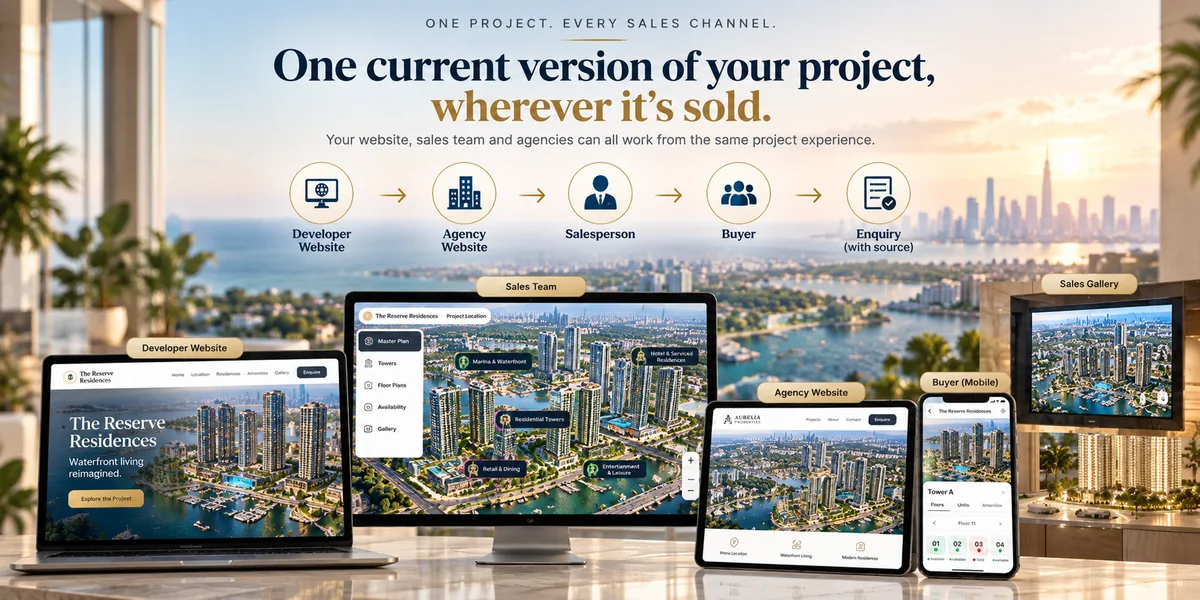
Most developers do not have a channel problem. They have a version problem.
The website has one set of plans. The agency has the PDF it was sent in March. The gallery has a printed board and a price list in a folder. The campaign points at a landing page built for a launch that has since moved on. All of them describe the same development, and no two of them agree.
Every new channel makes it worse, because every new channel has historically meant another copy to produce and another copy to forget about.
This guide is about the other model: publish the project once, then place it.
One project, many placements
A built project is not a page. It is a thing that can be placed, and each placement is a way in rather than a copy.
Its own link. The project has an address you can put anywhere: an email, a campaign, a WhatsApp message, a QR code on a hoarding or a brochure. It opens full screen, with nothing to install and no sign-up.
Embedded in your website. The project runs inside your own page, so buyers explore the development without leaving your domain and without you rebuilding anything you already have.
Embedded in your agencies' websites. The same project, on their sites, restricted to the domains you approve.
On the gallery screen. The same project again, full screen on the screen in your sales centre.
There is one project and one inventory behind all of them. Adding a channel means placing the project somewhere new, not producing another asset to maintain.
What a placement actually is
A placement is the project plus the rules for where it may appear.
Each one is tied to the domains you allow, so an embed cannot be lifted onto a site you never agreed to. Each one carries its own identity, which is what makes attribution work: when an enquiry arrives, you can see which placement produced it rather than inferring it from timing.
Placements have a lifecycle. One can be drafted while you agree terms, made active when the agency goes live, set inactive when a campaign ends, and revoked outright if a relationship ends. Revoking a placement stops that embed working without touching anyone else's.
This matters most with agencies. The usual arrangement gives an agency material and hopes it is used correctly. A placement gives them something better to work with and gives you something you never had: a verifiable answer to who produced an enquiry.
One limit worth planning around
The simplest embed, the script tag you paste into a page, does not carry 3D scenes or the geographic portfolio map. Those need the module-based embed or the project's own link.
For most projects this never comes up, because the masterplan, buildings, floors and units all work in every embed type. But if a project leads with a 3D building or sits inside a portfolio map, decide the placement before launch rather than discovering the limit afterwards.
Campaigns, QR codes and the printed world
A QR code on a hoarding is a strange thing to get right. It is printed once, it stays up for months, and whatever it points at has to still be true.
Pointing it at a project link rather than a campaign page solves that, because the project stays current while the campaign around it changes. A hoarding put up at groundbreaking still opens something accurate at handover.
The same applies to brochures, exhibition stands and press. The printed thing stops being a snapshot that ages and becomes a doorway to something that does not.
Where attribution comes from
When the project is embedded, the enquiry carries the context around it: which placement, which page, which campaign tags were on the URL, and which partner the placement belongs to.
A standalone link has no page around it to read, so an enquiry from one carries the project and unit but not the placement detail. That is not a gap to work around, it is a reason to be deliberate: put the project where you want the credit measured, and use links where you want reach.
If you need a specific person or agency credited, that is what referral links are for, and they work from a plain link too.
What this changes operationally
Nothing has to be reissued. A price change, a new phase, a sold-out tower: your team updates the inventory and every placement reflects it.
Agencies stop being a liability. They are showing your current project, not a file from last quarter, which removes the most common source of a buyer being told two different things.
You can add a channel cheaply. A new agency, a new market, an exhibition: place the project and go. The cost of another channel is a conversation, not a production job.
You can see which channel works. Not impressions. Enquiries, with the placement attached.
A sensible starting arrangement
Most developers end up with roughly this:
One embedded placement on their own project page, which is where most traffic lands. One standalone link for campaigns, QR codes and anything printed. One placement per agency, created when that agency signs. The gallery screen opening the same project. And referral links for individual salespeople on top.
That is five ways in, one project, one inventory, and one answer when someone asks what is still available.
Where to go next
How an interactive masterplan gets built covers the step before this one. Running RegalScene in your sales gallery covers the screen in the room.
If you want to see a published project before deciding how to place your own, open the live one.