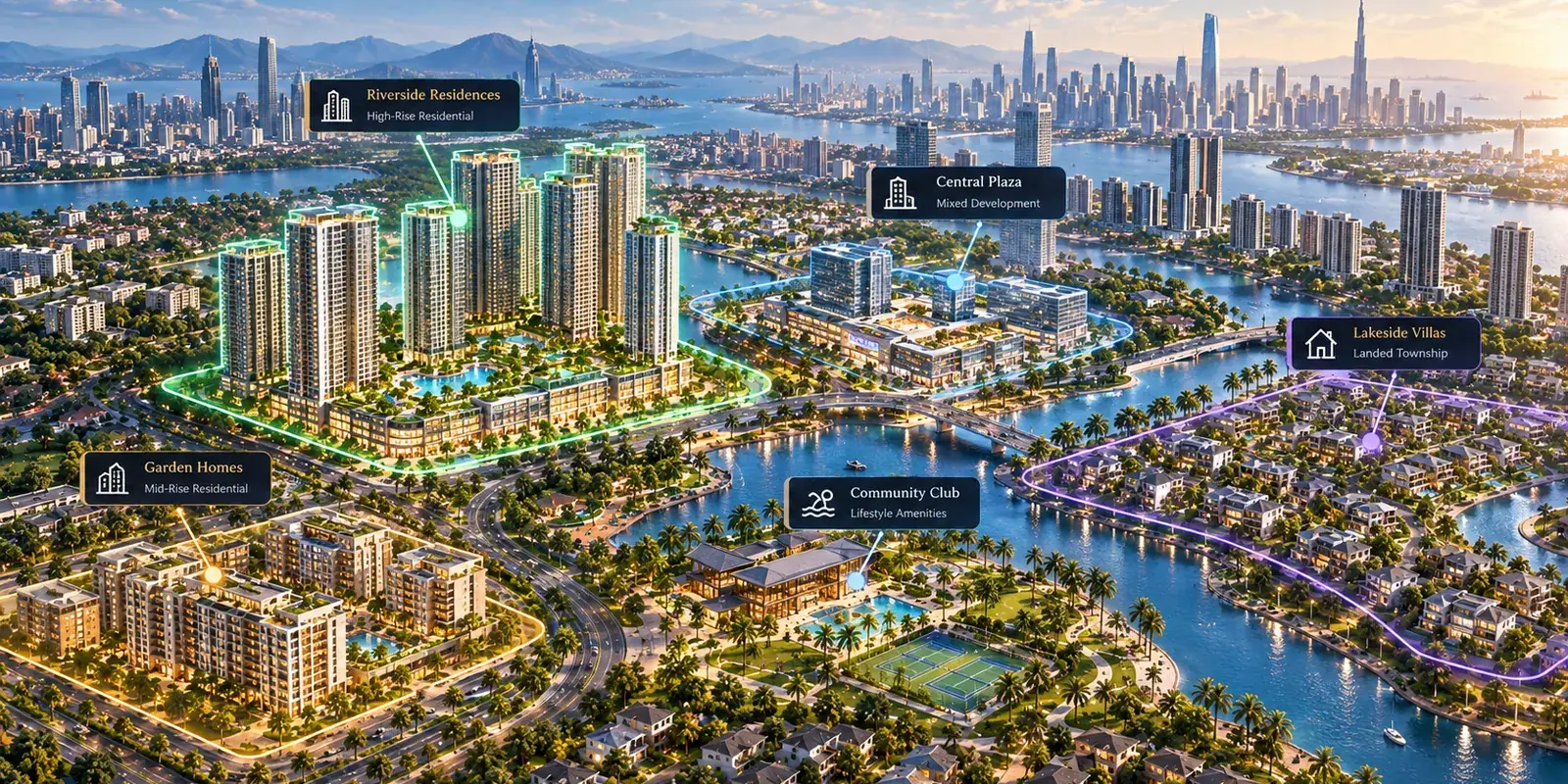
Developers rarely ask what an interactive masterplan is. By the time they call, they have seen one. The question is almost always the practical one: what would it take to do this for our project, and what do we have to give you?
This guide answers that end to end. What you need before anything starts, how the project gets built and published, what your sales team and your agencies do with it, and what comes back to you afterwards.
What you are actually building
Not a page. A connected experience that runs from the whole development down to a single unit.
A buyer opens the masterplan and sees the project in context: phases, precincts, buildings, amenities, the roads and the water around it. They open a zone, then a building, then a floor, then a unit. The unit shows its layout, its size, its details and whether it is still available. They compare it against another, send it to their phone, and enquire from the unit itself.
The same project runs on your website, inside your agencies' websites, on the screen in your sales gallery and on the buyer's phone afterwards. One project behind all of them.
You are not building a marketing asset. You are building the thing your whole sales operation presents from.
What you need before anything starts
Almost always, you already own it.
The artwork. The aerial render, the site plans, the floor plates and the building views you commissioned for the brochure and the sales gallery. Hand these over at full resolution rather than as the compressed copies that went to the web. The masterplan becomes deep-zoom tiles, so its pixel width decides how far a buyer can zoom before it softens.
The floor plans, separated by unit type rather than as one merged sheet.
The unit list. Unit code, type, bedrooms, size, floor, orientation, status, and price where you intend to show it.
One unit code, agreed. This is the one that causes trouble. If the floor plan, the price list and the sales system each name the same unit differently, every one of those has to be reconciled before availability can be connected to anything on screen.
New artwork is commissioned only where a building or a phase was never rendered at all. The full asset checklist is here.
How the project gets built
Your files become the interactive surface directly. The masterplan you paid for stays the masterplan buyers see.
The development is mapped onto that artwork: zones drawn over the plan, buildings made selectable, floors connected to each building, units drawn on each floor plate. What was one flat image becomes a path a buyer can walk.
Most projects are built in 2D, and that is not a lesser option. 2D is the mature surface: it carries unit filtering by status, bedrooms, tower, floor, type, orientation and price, the floor selector and floor stack, the labels layer, amenity markers, 360 views and attached floor-plan PDFs. It handles very large sites and many phases comfortably, and it runs on any phone.
Where a 3D model exists, a building can be explored as a model instead: the buyer turns it, sees which units face which way, and picks one off the facade with its current status. It is the newer surface and narrower than the plan today, so it is chosen for a building where height, orientation and view carry the decision rather than as a replacement for the masterplan.
The unit panel, availability, compare, sharing and the enquiry are one layer underneath both. What changes is how the project is drawn.
RegalScene builds the project with you rather than handing you an editor and a manual. You supply the files and the unit list; the project comes back built.
Connecting availability
This is the step that separates an interactive masterplan from an expensive picture.
Your unit schedule drives what buyers see. When your team marks a unit reserved, it shows as reserved on the plan, in the building, on the floor plate and in the filter, everywhere that project appears, without anyone republishing anything.
Units carry five states: available, reserved, sold, held and unreleased. Unreleased matters more than it sounds. It lets you publish a whole phase while deciding what to put on sale, so the project can be explored in full before anything in it is sellable.
A brochure shows what was available the day it went to print. This shows what is available now.
Publishing it where your buyers already are
A built project is published once and then placed.
It can live at its own link, which is what goes into a campaign, an email or a QR code on a hoarding. It can be embedded in your own website so buyers never leave your domain. It can be embedded in your agencies' websites, restricted to the domains you approve.
Each of those placements keeps its own attribution, so when an enquiry arrives you can see which one produced it rather than guessing.
The screen in the sales gallery
The same project runs full screen in a browser on the screen in your sales centre. There is no separate build for it, no kiosk application to install and nothing to keep in step with the web version, because it is the web version.
What that changes in the room is the conversation. Your consultant opens the masterplan in front of the buyer, moves into a tower, opens a floor and lands on a unit with its real status, rather than describing the development over a printed plan and checking availability on a separate list. When the buyer asks whether the one on the corner of level 18 is still free, the answer is on the screen they are already looking at.
Then they leave with it. The unit goes to their phone by QR code scanned off your screen, by WhatsApp, or by a link, and it opens on that unit. The shared link lands on your own project page, and a link one buyer forwards to another does not carry the first salesperson's credit with it.
The meeting stops being the only chance to explain the development.
Online and offline at the same time
Most developers run two versions of a project without meaning to: the one in the gallery and the one on the internet. They drift apart within a month, and the gap shows up as a buyer being told something different depending on where they asked.
One project removes that. The gallery screen, the website, the agency sites, the roadshow laptop and the buyer's phone are the same project with the same inventory behind them. Updating the inventory updates all of them.
Giving your sales team and your agencies their own links
Every salesperson and every agency agent can have their own link to the project.
Visits and enquiries that arrive through that link are credited to them automatically. The credit is held on the lead and follows agreed precedence rather than going to whoever happens to open it, and it stays on the lead even if names or agreements change later.
For your agencies this answers the question they actually care about. They can present current availability instead of last quarter's PDF, they can put the project on their own site, and the enquiries they bring are visibly theirs. The usual friction between a developer who knows what is available and an agency still telling buyers something else goes away, because both are looking at the same inventory.
Attribution stops being an argument and becomes a field on the lead.
What comes back to you
An enquiry arrives as a lead carrying the unit, the project, where the buyer came from and the journey they took on that visit: the views they opened, the units they looked at, what they shared, and how long they spent.
Your team opens the first call knowing the buyer was on level 18 of the east tower comparing two three-bedroom units, rather than opening with "how can I help". That is a different conversation, and it is the one most developers say they were missing.
Alongside the leads you can see where attention concentrates across the project: which zones and buildings buyers open, which units get looked at, where the enquiry funnel narrows. That is a different question from which parts you promoted, and the answer is sometimes uncomfortable and always useful.
What changes for the developer
More channels, without more versions. Your website, your agencies, campaigns, the gallery and the phone in a buyer's hand all present the same project. Adding a channel means placing the project somewhere new, not producing another asset to maintain.
More of the project visible. Buyers explore phases, towers and unit types they would never have asked about in a meeting, including at eleven at night from another country.
Fewer questions your team has to answer twice. What is available, what the layout is, what is nearby, how big it is. The plan answers those, which leaves your consultants doing the part that needs a person.
Interest becomes information. You learn what buyers actually open, which tells you something about the next phase.
After it is live
A project is not finished at launch. Phases release, prices move, buildings top out, availability changes daily.
Inventory is maintained by your team and reflected everywhere immediately. Changes to the project itself, new phases, a tower added, a precinct re-drawn, are made with you rather than being another procurement exercise.
Where to go next
If you are still deciding whether this is the right format, how to choose interactive masterplan software covers what to look for. If you want to see one before committing anything, open the live project and go through it as a buyer would.
If you are ready to talk about your own development, tell us what you are selling and where. The first useful conversation is usually about your unit list, not your renders.