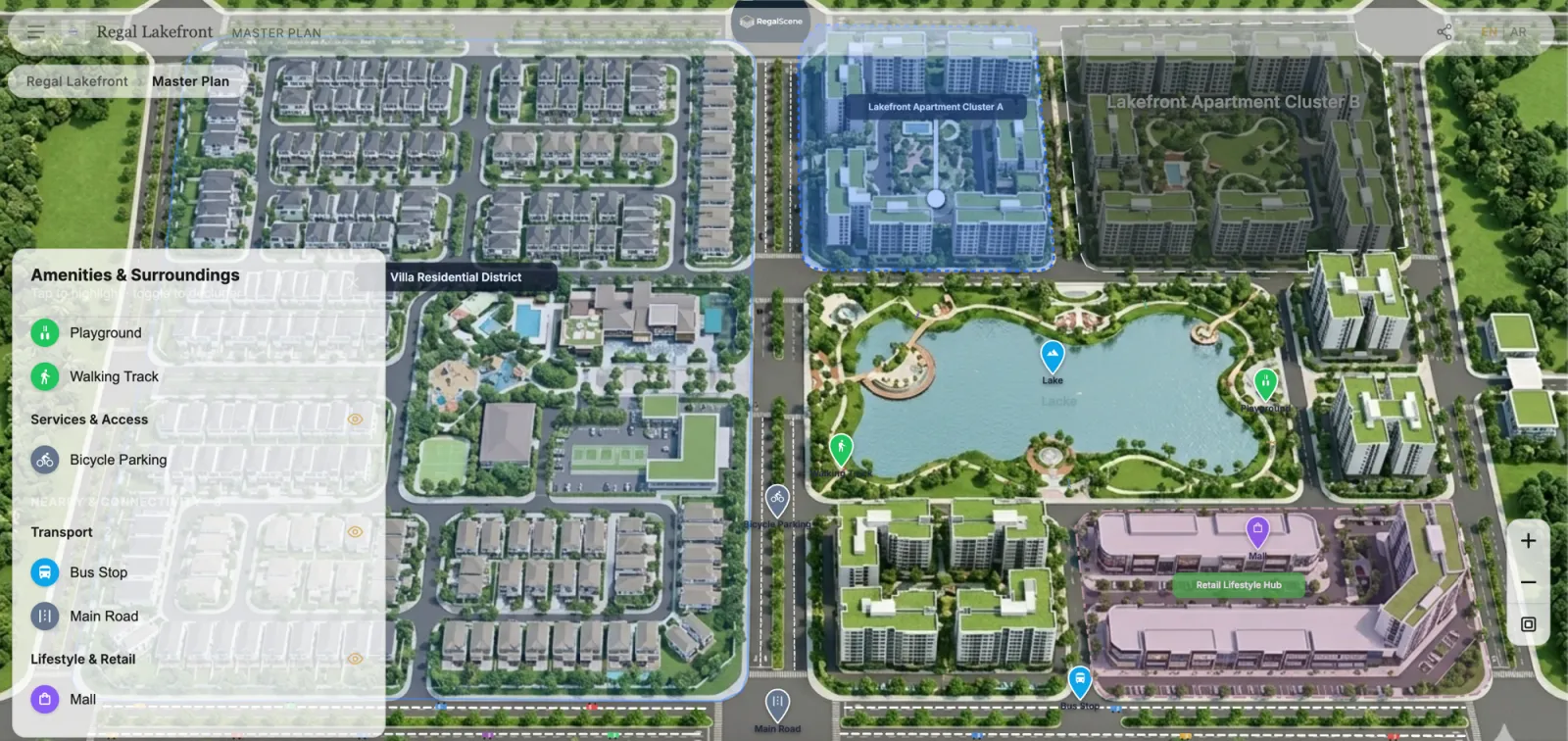
Interactive masterplan software turns a development's site plan into something buyers can explore: they zoom across the whole project, open a building and a floor, see which units are available, and enquire about one. Choosing it is harder than it looks, because tools sold under the same name do very different jobs.
Some are 3D visualization products built to impress in a sales gallery. Some are maps with the masterplan laid over them. Some are sales platforms that connect the masterplan to your inventory, your sales team and your agencies. All three call themselves an interactive masterplan (or interactive master plan; the two spellings mean the same thing).
This guide is the decision process we would use. Two companion pieces go deeper: the feature checklist and the four types of interactive masterplan software, compared.
Start with the job, not the demo
Every vendor demo looks good. The useful question is what the software has to do on an ordinary Tuesday six months after launch. There are three possible jobs:
- Present the place. A visual centerpiece for the sales gallery and the launch event: the community, the views, the amenities.
- Sell the units. Buyers find what is available, compare it and enquire, on their own phone, at any hour.
- Run the sale. The enquiry reaches the right salesperson with context, agencies sell the same current project, and your team updates inventory without calling a vendor.
A visualization tool can do the first job brilliantly and stop there. If you need the second and third, judge every product on those first.
Decide which of the three jobs you are buying before you watch a single demo.
Choose the format for each part of the project
You do not need one format for everything. A typical project uses several:
- The whole development: a 2D masterplan buyers can zoom into, from the full site down to a plot.
- A building: a 360 view so buyers can turn it and see every side.
- A floor: a floor plan with each unit marked and its status shown.
- The flagship or the hero view: a 3D model, if you already have one.
What matters is that the formats connect into one journey, so a buyer moves from the masterplan to a unit without starting again somewhere new. If you are weighing 3D against 2D, this comparison covers the trade-offs.
Ask whether the formats you have can become one journey, not which format looks best.
What to consider
Live availability from your inventory. Is the status a buyer sees coming from your inventory, or is it painted into the artwork? When your team marks a unit sold, it should show as sold on the masterplan, the building and the floor, on every channel, without anything being re-published.
A journey down to the unit. Can buyers go from the whole project to a project, a building, a floor and one unit, and see its layout, details and current status there?
Enquiries that arrive as leads. When a buyer enquires, what does your sales team receive? A name and a number, or a lead with the unit, the source and the steps the buyer took on that visit?
Agencies and salespeople. If you sell through agencies, can each one show the same current project on its own website and see only its own leads? Can each salesperson have their own link, so leads are credited to whoever brought the buyer?
Updates after launch. Who changes prices, availability and content once it is live: your team, or the vendor through a change request?
Many projects or phases. If you run several developments, can buyers start from one map of everything you sell and continue into each project? Do new phases join the same experience?
Phones and sharing. Does it open in a mobile browser with nothing to install, and can a buyer share the exact unit with family by link, QR code or WhatsApp?
Languages and markets. Which languages can buyers switch to, and does Arabic run right to left properly?
How it is priced. Per unit, per view, or per project? Make sure the quote covers what happens after launch, not only the build.
The considerations that decide value are the ones you only notice after launch: inventory, leads, agencies and updates.
Questions to ask every vendor
Use the same questions with each vendor so the answers are comparable:
- Show me what a buyer sees right after a unit is sold.
- Where does unit availability come from, and who updates it?
- What exactly arrives with an enquiry? Show me a real lead record.
- Can an agency show this on its own website and see only its own leads?
- How do I credit a salesperson or agency for the leads they bring?
- How do we add the next phase or a new project?
- Does it run in a phone browser with nothing to install? Show me on my phone.
- Which formats can we use: 2D, 360, 3D? Can we use the renders we already have?
- What does it not do? (Integrations, VR, offline use, CRM connectors.)
- What is in the quote after launch?
A vendor who can answer question 1 on a live project in a few minutes is selling a system, not a showreel.
Red flags
- Availability is part of the image. If changing a unit's status means re-exporting artwork, it will be out of date by the second week.
- Every change is a change order. You are buying month six, not launch day.
- Enquiries go to a generic inbox. Without the unit and the source, your sales team starts from scratch.
- It only works on the gallery screen. Most buyers first see the project on a phone.
- No answer to "what does it not do?" Every product has limits; a vendor who names them is easier to trust.
A shortlist process that works
- Write down the job (present, sell, run) and the projects it must cover in the next two years.
- List your assets: masterplan render, building views, floor plans, unit list, any 3D model. This guide covers what to prepare.
- Shortlist three vendors from different types, so you see the real trade-offs (the four types compared).
- Run the ten questions above with each, on a live project rather than a demo build.
- Test it as a buyer on your own phone, then ask to see the lead it produces.
The test that settles most shortlists: enquire as a buyer, then ask to see what the sales team received.
Where RegalScene fits
RegalScene is a sales platform. Buyers explore from the masterplan to a project, a tower and a unit, with live availability from your inventory, and enquire from the unit itself. Your team receives the lead with the unit, the source and the buyer's steps from that visit, agencies and salespeople get their own links, and developers with many projects can put them all on one Google Maps portfolio. It uses 2D masterplans, 360 building views and existing 3D models in one journey.
What it does not do: VR walkthroughs, live finish customization, or a direct CRM connector today. If your main need is a cinematic 3D centerpiece for the gallery, a visualization product may suit you better; the comparison explains when.
Related reading:
- Interactive Masterplan Software Compared: The Four Types of Tool
- Interactive Masterplan Features: A Developer's Checklist
- Digital Sales Center Software: How to Choose in 2026
- What Is an Interactive Master Plan?
RegalScene takes buyers from the interactive masterplan to the unit and delivers each enquiry to your sales team as a lead with the buyer's journey. See the platform, open the live showcase or discuss your project.