A Kuala Lumpur launch has beautiful floor plans and a price list nobody connects to them. The plan lives in a brochure or a PDF; availability lives in a separate sheet; and the buyer who likes unit 18-03 still cannot tell whether it is available without messaging an agent, who checks a sheet, who checks with the gallery. By the time the answer comes back, the moment has cooled.
The floor plan is where a buyer chooses a specific home. When it cannot tell them what is available, it is doing half its job.
Where the plan and the price list stop talking
The specific failure in high-rise selling is the gap between the floor plan and availability. Both exist; they just do not talk. A buyer reads the layout on the plan and reads availability, if they can find it, on a different document that may be a week out of date. Nothing on the plan tells them the one thing that decides the sale: can I still have this unit, and what does it cost?
An interactive floor plan closes that gap by drawing status on the plan itself. The unit a buyer taps carries its own state, and the price sits with it under the developer's display policy. What was two documents and a phone call becomes one tap.
In high-rise selling, the buyer's real question is not what the unit looks like. It is whether they can still have it.
From the floor plate to the enquiry
An interactive floor plan turns the plan into a step in a journey rather than a dead end:
- Floor plate. The floor opens with every unit drawn in place, labeled by typology and colored by current status.
- Unit. A tap opens the unit: its layout, its size, its orientation, its price under the display policy.
- Enquiry. The buyer enquires from the unit, and the lead carries which floor and which unit they were looking at.
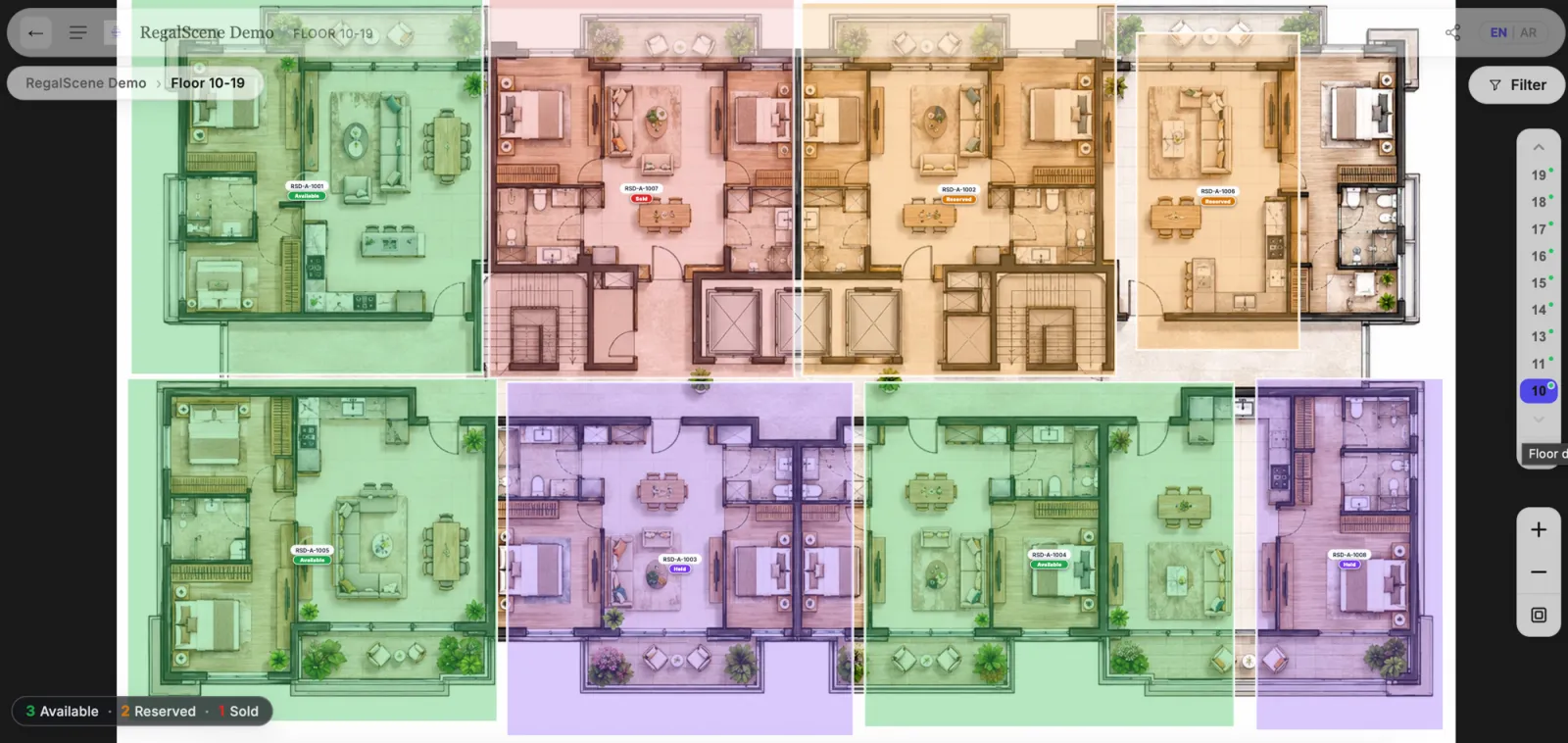
This is the step where a browsing visitor becomes a buyer with a specific unit in mind, following the same lead-to-unit journey the rest of the experience uses. And it does not sit alone: the floor plan is one layer of the interactive sales gallery a KL high-rise runs, reached from the site plan and the tower's stacking view.
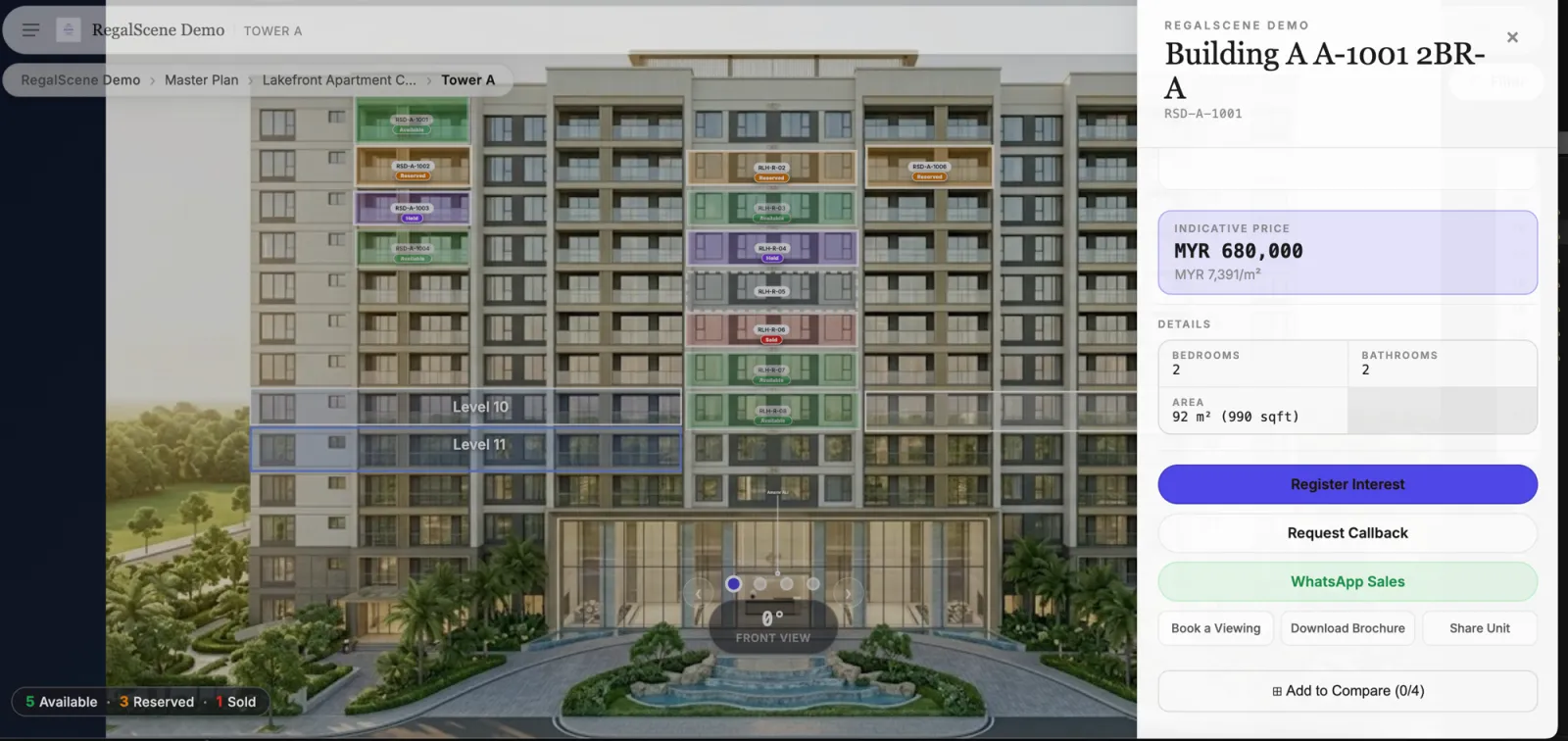
The floor plan inside the whole journey
A floor plan is most useful when it sits in a path, not on its own. A buyer arrives at the site plan, opens a tower, reads its stacking plan, opens a floor, and chooses a unit, following the same map, building, floor, and unit structure throughout. The floor plate is the moment the choice narrows to one home, which is why connecting it to current availability matters more here than anywhere else in the journey.
Current status without a bigger bill
Making a floor plan interactive does not mean paying per floor. RegalScene scopes and quotes each project around what will be delivered and operated rather than charging per floor, and a floor plate can be one view serving many repeating floors through a shared layout, with the right units linked to each. The apartments on those floors are inventory on the scene, not views of their own.
A KL tower could carry its floors as a small handful of views, adding depth only where buyers want it. The reasoning behind scoping projects rather than charging per unit explains why the unit count does not drive the price, and the pricing page sets out what shapes a quote.
Drawing status on every floor plan does not multiply the cost. The number of authored views does.
What this asks of the developer
Two things make an interactive floor plan hold up. The inventory has to be the live source of status, so a sold unit reads as sold the moment the team updates it, on the plan itself. And the display policy stays the developer's decision, so whether prices show to buyers or only to agents is set centrally. With those in place, the floor plan stops being a picture and becomes the point where a buyer commits to a specific home.
See your floor plans made interactive
The fastest way to judge this is on a tower you are selling. Bring a floor plate and a unit schedule, and watch a buyer move from the plan to a single available unit to an enquiry, in a browser, on a phone.
Related reading:
- Interactive Floor Plan Software: From Static Plan to Current Availability
- Interactive Sales Galleries for KL High-Rise Projects
- From Lead to Unit Selection: The Online Property Journey
- Map, Building, Floor and Unit Views: How to Present a Project Online
- Why RegalScene Isn't Priced Per Unit
RegalScene turns the floor plans KL developers already have into an interactive step where buyers see current availability and enquire, in any browser. See the platform or tell us about your project.