A residential development can have 80 units or 2,000. Ask most property software what that difference costs you, and the honest answer is: a lot. Pricing that climbs with unit count treats a 2,000-unit project as though it needs twenty-five times more of everything than an 80-unit one.
It rarely does. A longer unit schedule does not usually mean twenty-five times more for a buyer to look at. So why should it cost twenty-five times more to present?
RegalScene is not priced by the number of units in your inventory. Each project is scoped around what it needs to deliver and operate, and that one decision changes the math for large towers, master-planned communities, and multi-project portfolios.
Your quote follows what the project needs, not the length of your unit schedule.
Why pricing by unit count works against large projects
Charging by unit count is easy to understand. More units can mean more inventory records, more availability to track, more rows in a database. So a common pattern in property technology is to tie pricing to unit count, or to unit bands that step up as a project grows.
The trouble is that unit count and visual work are not the same thing. The number of units in a spreadsheet tells you very little about how many visual views a buyer needs to get from the map to the right home. Two developments make the point.
Development A has 120 apartments, twelve different floor layouts, and several building types. It holds a modest amount of inventory but a lot of distinct visual views.
Development B has 1,500 apartments in a single tower, floors that repeat as they rise, and a handful of shared layouts. Far more inventory, far fewer distinct views.
Development B carries more than ten times the units of Development A and less to actually draw. When the bill is driven mainly by unit count, the bigger project pays more for a visual experience that is largely the same view repeated. That is a developer being charged for a spreadsheet, not for an experience.
Unit count measures your inventory, not the work of building the buyer journey.
What a view actually is
Before the pricing makes sense, it helps to be precise about the word.
A view is a single frame a buyer looks at: one full frame of the project, with everything on it made interactive. It is what fills the screen at a given moment, not the data behind it.
Some views are the obvious ones:
- A location map, the whole site seen from above, with the project set in its surroundings.
- A master plan, the development laid out, with zones and buildings selectable.
- A floor plan, one floor with its units outlined and colored by availability.
Others are angles of the same building. A tower might be shown straight on at 0°, then turned to 15°, 30°, and on around, so a buyer can read every face of it. Each of those angles is its own view, and together they let a buyer walk around the building with no heavy 3D download.
Connected, these views become the journey a buyer travels:
Location → Master Plan → Building → Building View → Floor → Unit → Enquiry
Each meaningful view is one step. And none of it starts from a blank page, because RegalScene builds these views from the renders, floor plans, master plans, and building images you already own, then layers navigation, current availability, and enquiry on top. The views are how a buyer moves through the project. They are not what the price is counted in.
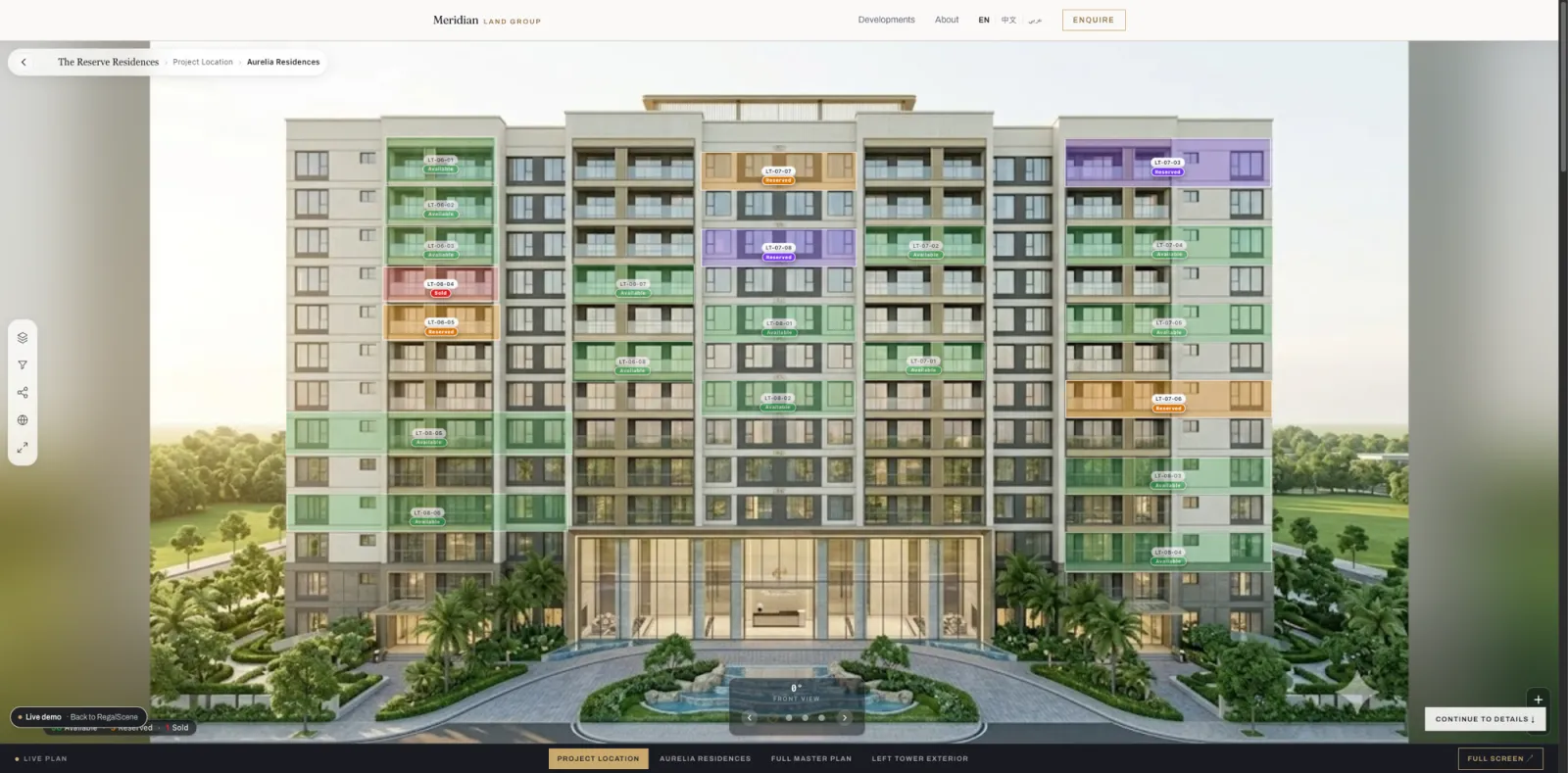
A view is one frame a buyer explores, whether a map, a floor, or a building at one angle. What you pay follows the work of building and running the experience, not the units inside it.
One view can stand for hundreds of units
Here is where it gets efficient. Picture a 30-storey residential tower where floors 3 through 25 share exactly the same floor-plan geometry. Twenty-three floors, one shape.
The heavy-handed way is to treat every floor as its own visual build: twenty-three near-identical views to create, review, and maintain. RegalScene uses a shared floor instead. The visual view is created once, and the right inventory is mapped to whichever floor the buyer opens.
Floor 10 shows units A-1001 to A-1004. Floor 11 shows A-1101 to A-1104. Floor 12 shows A-1201 to A-1204. Same geometry, different inventory, every time.
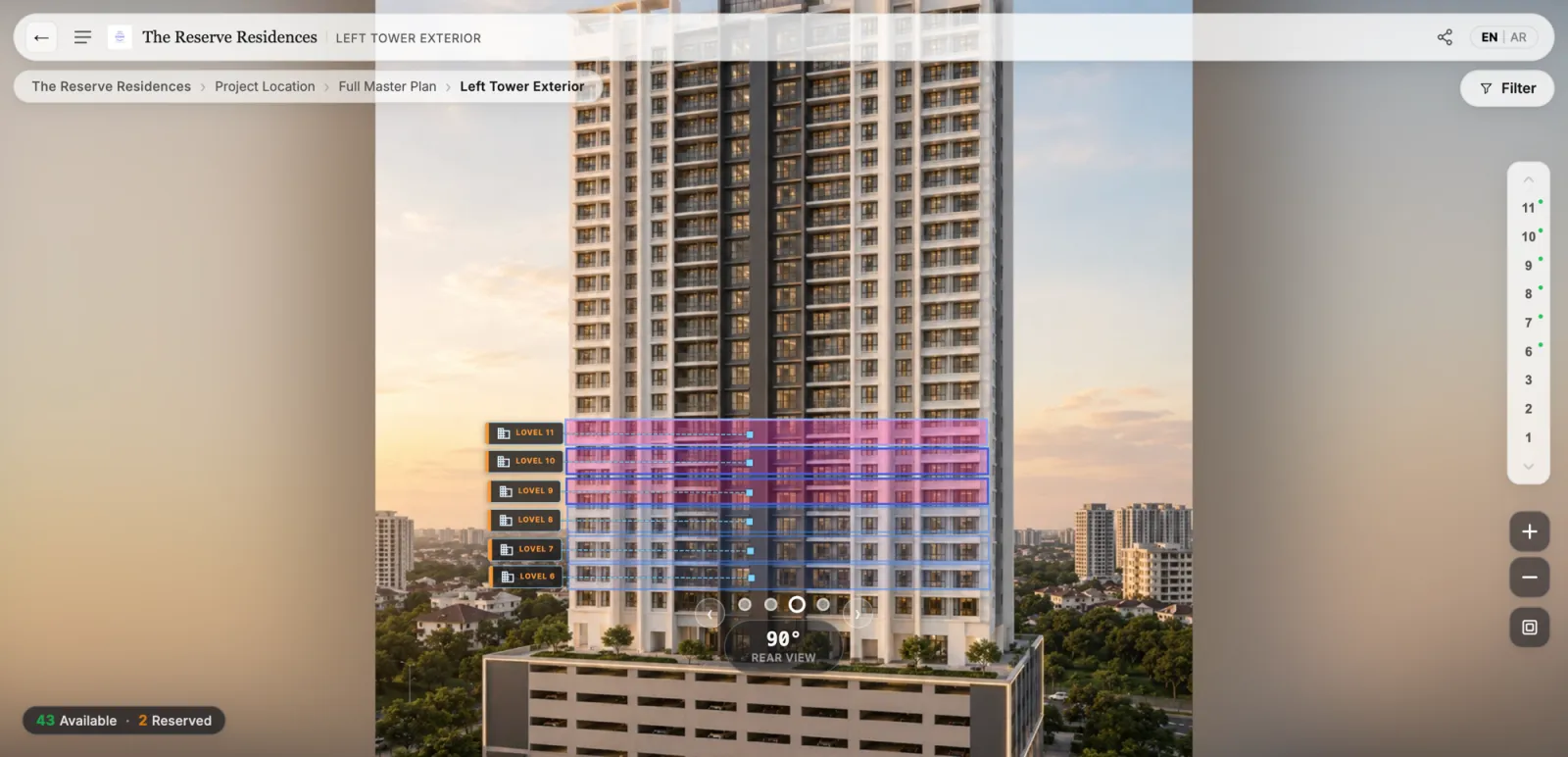
The geometry is reused. The inventory changes. The buyer still lands on the correct floor, sees the correct units, and reads the correct availability. What the developer does not need is twenty near-identical views to build, review, and maintain just because the tower has twenty floors.
A view can hold one unit or a thousand. To the buyer it looks the same. That is the whole point.
Build the floor once, and every level that repeats it reuses the same work.
1,500 units, 17 views
The difference comes down to two sentences.
A platform priced by unit count effectively tells a large developer:
You have 1,500 units, therefore you pay more.
RegalScene starts somewhere else:
You have 1,500 units, and the buyer journey needs 17 views to present them.
The 1,500 units are still there, tracked, live, and enquirable. They are simply not what your price is counted in. Each project is scoped and quoted on what needs to be delivered and operated, from the buyer journey to the channels it runs on. Adding units to a view does not, on its own, make the project bigger to deliver.
More units do not automatically mean a bigger quote.
What this means for your cost
Put the two ideas together, a journey built from views rather than counted in units, and a shared floor for anything that repeats, and the commercial picture changes for exactly the projects that struggle most under per-unit pricing.
A large tower is not punished for stacking identical floors. A master-planned community is not billed as if each of its thousands of plots were a separate visual build. A new phase or project adds only what is genuinely new to build, rather than multiplying a per-unit rate across every launch.
You still get the full, connected experience: map, building, floor, and unit views, current availability, and contextual enquiries. You are simply not charged for scale you are not creating. For how RegalScene structures pricing in practice, the interactive master plan cost guide walks through the model.
Scale in your inventory should not automatically mean scale in your bill.
The projects that gain the most
Not pricing per unit helps every project, but it changes the numbers most for the large ones:
- Residential towers with floors that repeat all the way up.
- Master-planned communities with thousands of plots across reusable zones and typologies, where large master plans stay fast in a browser.
- Multi-project portfolios presented under one portfolio map, where projects share structure.
- Phased launches, where each new phase adds what it needs over time instead of a new charge for every unit.
These are the developments that need interactive presentation the most, and the ones a per-unit model quietly penalizes for their size. RegalScene is designed so that your largest projects are not your most expensive experiences by default. Because the whole thing is built from the assets you already own, the efficiency starts before the first view is even built.
The projects that gain the most are the ones a per-unit model charges the most.
The RegalScene approach
Pricing should reflect the work of building a buyer experience, not the length of a unit schedule. A project with 2,000 units and one with 80 can call for a similar amount of work, so they should not sit at opposite ends of a price list simply because one has more rows in its inventory.
RegalScene scopes each project around what it needs to deliver and operate. Not units. A shared floor for anything that repeats. Your existing assets as the starting point. It is a fairer model, and for large developments it is usually a far more efficient one.
Scope the project, not the inventory, and the biggest projects finally add up.
Related reading:
- How Much Does an Interactive Master Plan Cost?
- One Master Plan, Many Projects: The Developer Portfolio Map
- Map, Building, Floor and Unit Views: How to Present a Project Online
- How Massive Master Plans Stay Fast in a Normal Browser
- Interactive Master Plans for Townships and Mixed-Use Developments
RegalScene turns the renders, floor plans, and master plans developers already have into one interactive sales experience, scoped around what each project needs rather than priced by unit count. See the platform or book a demo.