Solutions
Nobody in the room can say if it is still available.
A buyer points at a unit and asks one question. The salesperson checks a spreadsheet, then checks a phone, then promises to confirm by evening. By the time the answer arrives, the buyer is looking at something else.
Opens the demo tower, with every unit state showing. No sign-up.
The problem
The answer exists. It is just not where the question is.
Somewhere in the business, someone knows that unit is reserved. The problem is that the buyer is standing in front of a different surface: a gallery screen, an agency's website, a link someone forwarded, a printed sheet. Each of those was accurate when it was made.
So the question gets escalated instead of answered. Not because anyone is careless, but because the place the buyer is looking and the place the truth lives are two different places.
What a buyer needs is not a faster way to ask. It is a view that already knows.
What it costs
The cost lands on the sale, not on the spreadsheet.
- The unit sold twice. Two agents commit the same unit on the same afternoon. One buyer is called back and told the truth, and that call costs more than the unit.
- The unit held for nobody. A hold was placed months ago for a buyer who moved on. It was never released, so it has been invisible to every channel since.
- The agency selling last quarter's stock. An agency works hard on a tower that is largely gone, because the list they were sent was accurate when it was sent.
- The buyer who waits. The one question that needed an immediate answer got a callback instead. Momentum is the thing that was actually lost.
What good looks like
One status. Changed once. True everywhere.
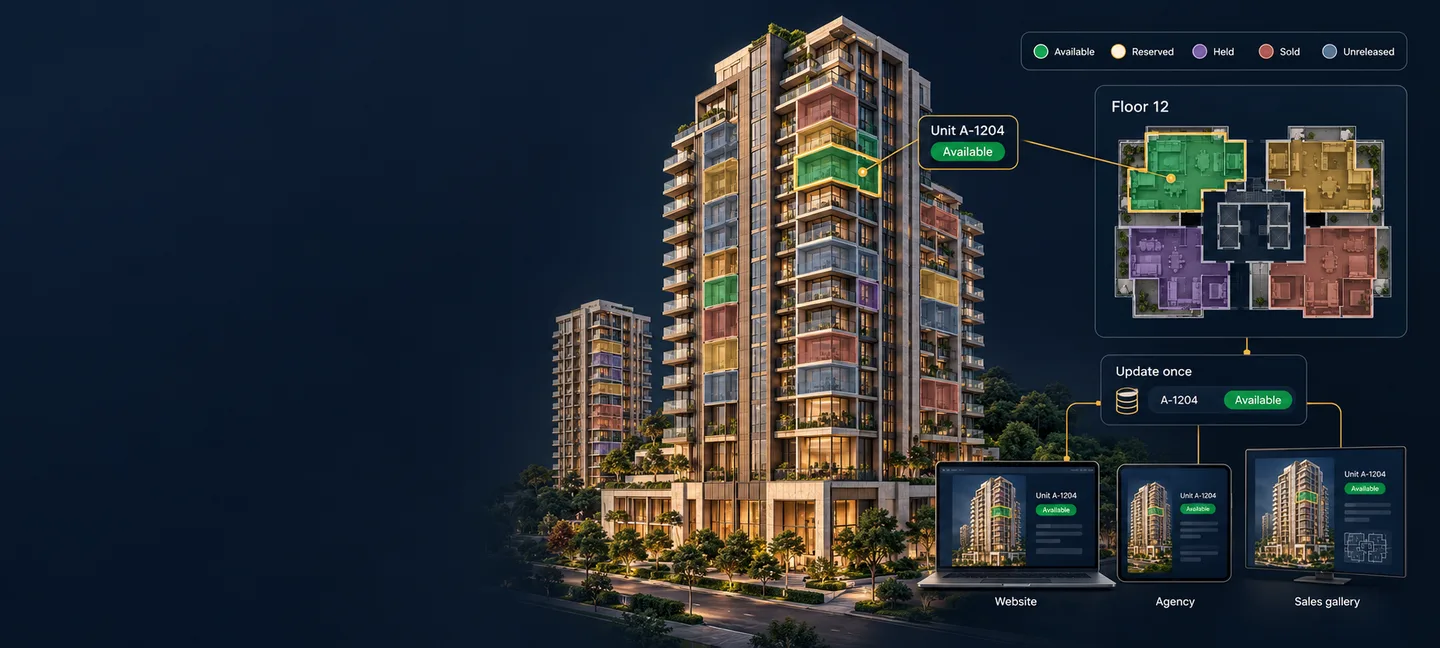
The fix is not a better spreadsheet or a stricter process for circulating it. It is having one status per unit that every channel reads, so that updating it once updates it everywhere, and nobody has to remember to tell anyone.
The sales team stops reconciling versions. The agency stops working from an attachment. The person at the gallery screen can answer the question while the buyer is still standing there.
How it works
How does a status change reach every channel?
Because no channel holds a copy. Your website, your agencies' embeds, the standalone link and the gallery screen all read the same project, and a unit's status is read at the moment a view is opened rather than built into it. Your team changes a unit once in the admin console, and the next person to open that tower sees the change. There is no republishing step and no deployment.
The honest boundary: this is not a live push to a screen that is already open. Someone staring at a floor plate at the moment you make the change sees it when they move or reopen, not before.
It is not a publishing act, and the permissions prove it: the role that maintains availability holds no authoring or publishing rights at all. Keeping inventory current and changing what the project looks like are two different jobs, held by two different people.
The states
What do the five unit availability states mean?
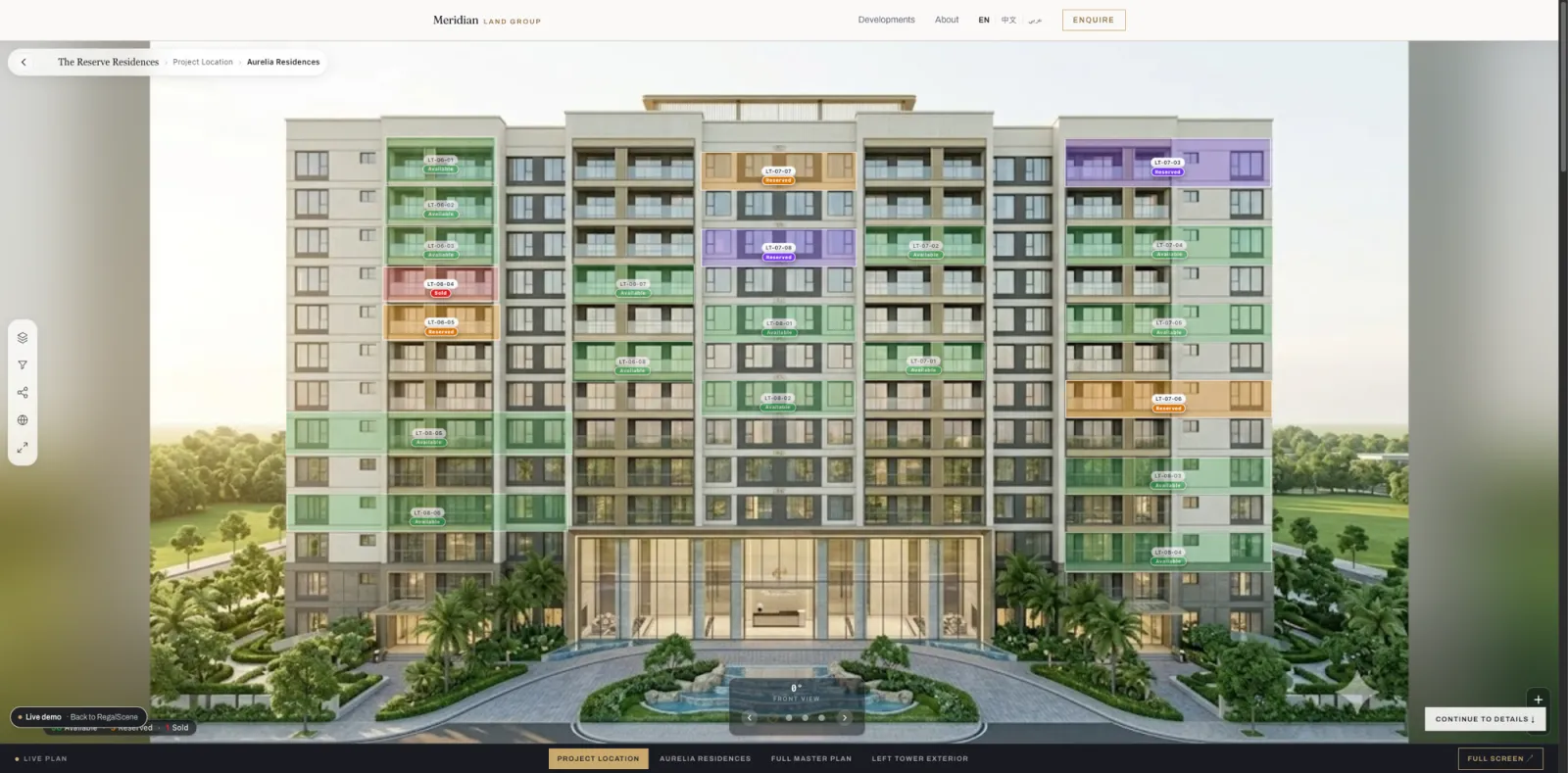
Five, deliberately, because four was not enough to describe how developments actually sell and six invited arguments about the difference.
- Available
- Offered, and a buyer can enquire about it now.
- Reserved
- Spoken for, pending completion of whatever your process requires. Visible, not sellable.
- Held
- Taken off the market by you — for a negotiation, a staff allocation, or a decision not yet made.
- Sold
- Gone. Still shown, because an empty tower tells a buyer nothing about how well it is selling.
- Unreleased
- Part of the development, not yet offered. This is what makes phased selling work.
Releasing a phase is a status change rather than a rebuild. You publish the tower once, release what you want to sell, and open the rest when the time comes, without anyone rebuilding or redeploying anything.
How much you reveal
How much should a buyer be allowed to see?
Showing what is left is a commercial decision, not a technical one. A confidential launch and a tower that is nearly gone call for different answers, so the summary has three settings.
- Exact
- Real numbers, broken down by status. Honest, and it works in your favour while a project is selling well.
- Limited
- No numbers at all. A buyer sees that something is available, that availability is limited, or that it is gone. You set where the line sits.
- Hidden
- No summary. Units still carry their own status, but the project does not announce its totals. The usual choice before a launch is public.
Price is a separate decision again. A unit can be openly available with its price on request, or sold with the price still showing. Neither setting forces the other, and prices can be shown in full, as a range, from a figure, or not at all.
What the buyer sees
Can buyers filter by what is actually available?
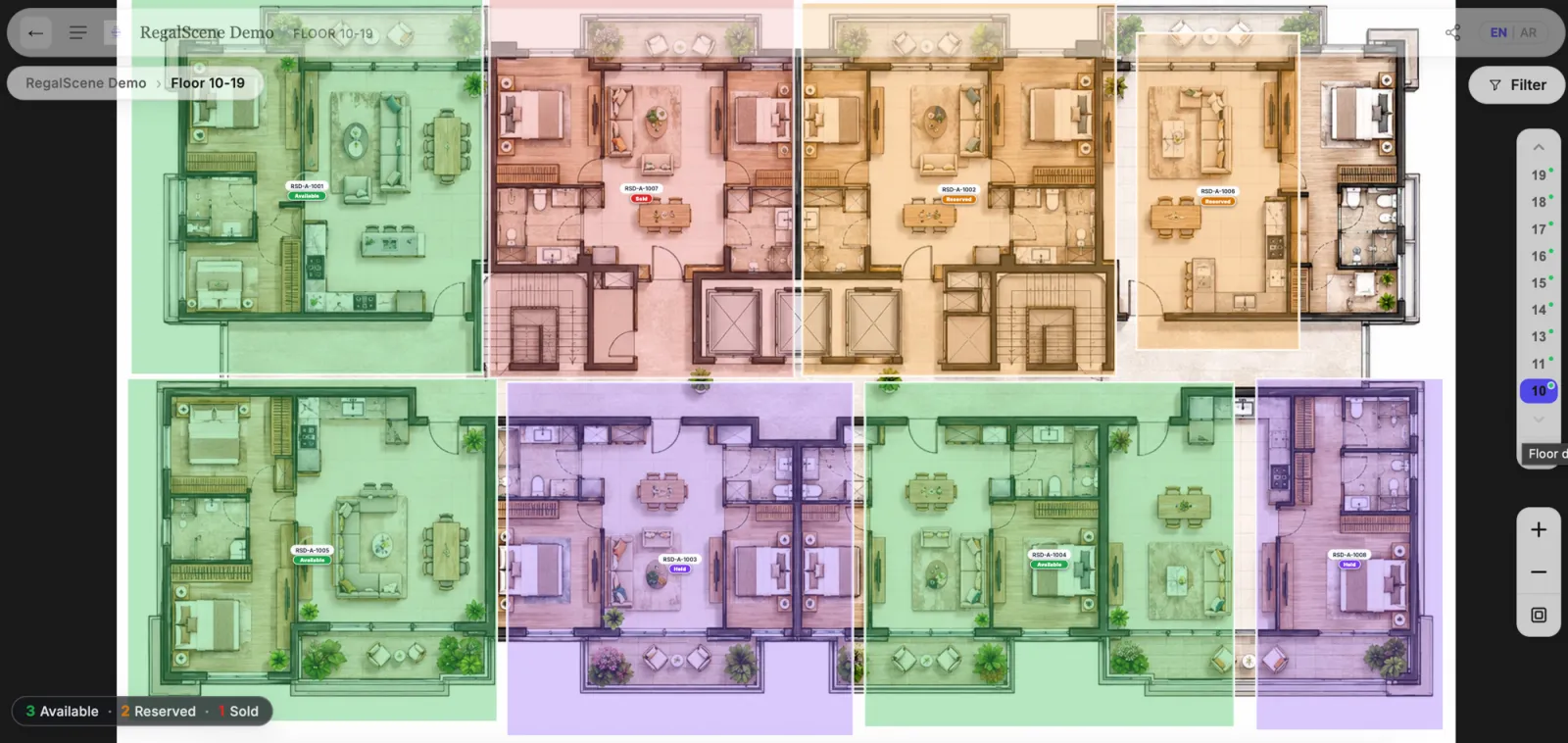
Yes. A buyer can narrow a tower to the units that match what they want and see status on each one as they go, from the master plan down to a single floor plate. They are not reading a status column in a table. The status is on the unit, where they are already looking.
The same view works on a phone in a buyer's hand and on the screen in your sales gallery, because it is one experience rather than a build per device.
The boundary
What this is not.
This is the answer to “is this one still available”, kept consistent everywhere your project is shown. It is deliberately not more than that.
- Not an ERP. It does not run your business.
- Not transaction management. Contracts, payment schedules and bookings stay where they already live.
- Not a CRM replacement. Enquiries arrive with the unit and the journey attached, and go on to your process from there.
Where a system of record already exists, availability is scoped against it during implementation rather than replaced by us.
Questions
Questions developers ask about availability
How quickly does a status change show up for buyers?
On the next view a buyer opens, with up to about a minute of browser caching on top. Status is read when a scene is requested rather than baked into it, so a unit marked sold is sold the next time anyone opens that tower, floor or unit panel. There is no republishing step and no deployment. It is not a push to a screen already open: someone looking at a floor plate when you make the change sees it when they move or reopen.
Who can change a unit's status?
Whoever you put in charge of inventory. There is a dedicated Inventory manager role, scoped to the projects you assign, alongside project and workspace administrators. It is day-to-day operational work that does not need RegalScene, a developer, or a release. Note that the role is deliberate: a general sales login can read availability without being able to change it.
Does the same status show on our agencies' websites?
Yes. An agency embeds the same project rather than receiving a copy of it, so the status your team sets is the status their visitors see. Agencies are scoped to the projects you grant them, and each agency's enquiries stay attributed to that agency.
Can we hold units back before launch?
That is what the unreleased state is for. An unreleased unit is part of the project but is not offered yet, so you can publish a tower while only releasing part of it and open the rest when you choose. Releasing a phase is a status change, not a rebuild.
What does the availability count on a project actually count?
Available, reserved and sold, by default. Held and unreleased units sit outside that total on purpose, because neither is something a buyer could have bought. A project can change which statuses count toward it.
Is this an ERP or a sales transaction system?
No. It holds the availability state a buyer and a salesperson need to see, not contracts, payment schedules or bookings. It is the answer to 'is this one still available', kept consistent everywhere the project is shown.

See it with every state showing.
The demo tower carries all five states at once, the way a real development does halfway through selling. Open it, filter it, and ask whether your own buyers could get that answer this quickly.