There's a specific moment every property marketing manager knows: the campaign is live, a zone just sold out, and the interactive experience — the one the agency built — still shows it available. The fix is a support ticket, a change order, and a two-week wait. The tool that was supposed to accelerate sales now moves slower than the sales themselves.
That's the problem a no-code studio exists to remove. Not "no-code" as a buzzword — as a specific transfer of power: the people who own the message (marketing) get to build and change the experience, without borrowing engineers.
What "no technical expertise" actually means here
It doesn't mean simplified output. The published result is the full journey — deep-zoom master plan, building views with every unit selectable, floor plates, live availability, enquiry capture:
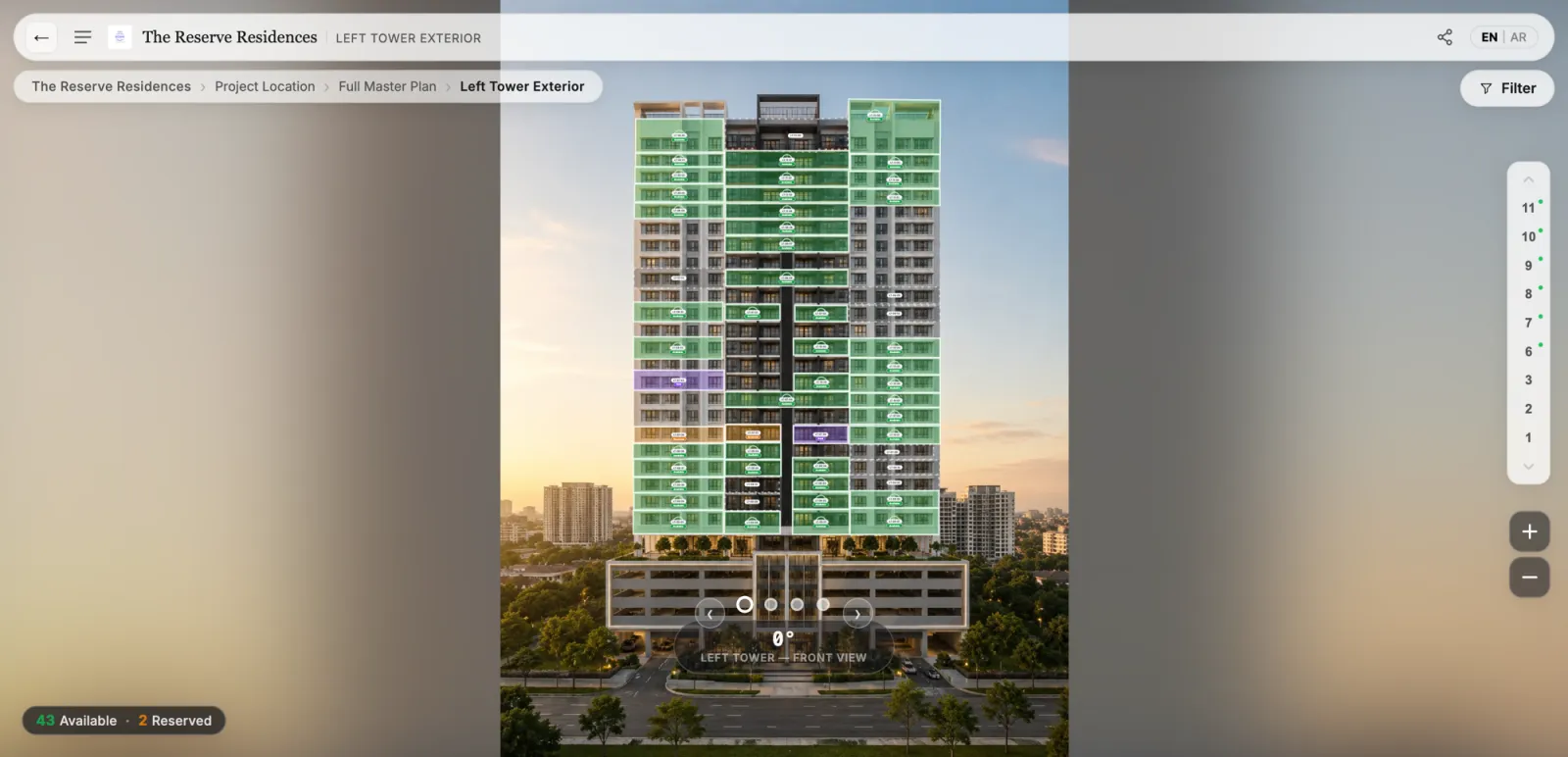
What it means is that producing that result looks like using a design tool, not a development project:
Draw, don't code. Upload the master plan render, trace the buildings; upload the elevation, trace the units; upload the floor plate, trace the apartments. Duplicate a shape along a facade instead of drawing forty times. If you can use presentation software, this is familiar territory.
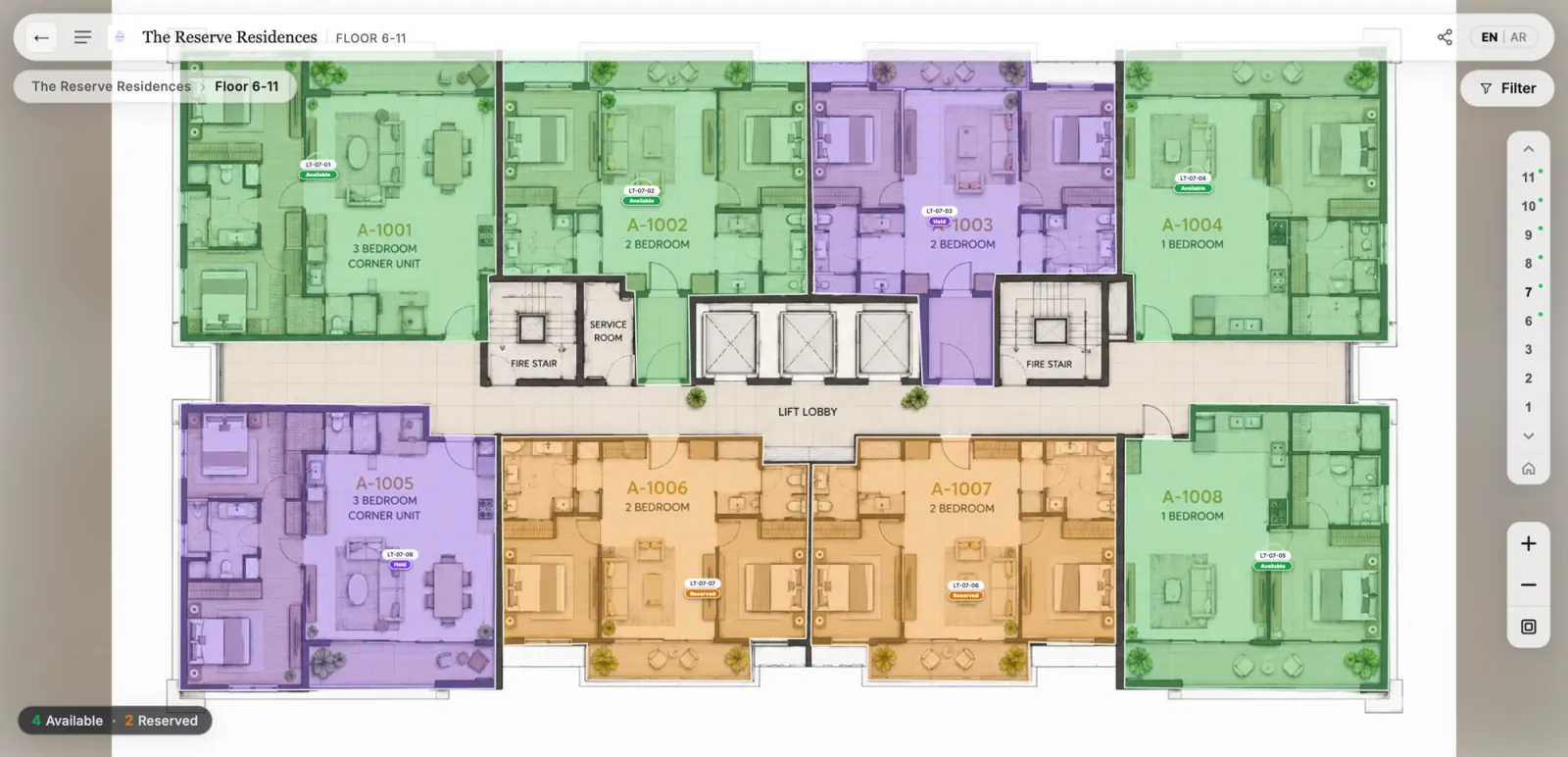
Connect, don't integrate. The unit list arrives as a spreadsheet — codes, types, sizes, statuses, prices. Draw-once, bind-once: every overlay knows its unit, and from then on the data drives the visuals. Change a status in inventory and every view — master plan summary, facade, floor plate, unit card — updates itself.
Style with intent. Labels with multiple lines, zone colors, points of interest by category, bilingual text on every element — the presentation layer marketers actually control in campaigns, controllable here too. The status colors that matter to buyers (available, reserved, sold) stay consistent automatically.
Publishing like a professional, without the professional overhead
The part that separates a studio from a drawing tool is what happens at "go live":
- Draft vs published. You edit safely in a working version; buyers only ever see the stable published one. No "pardon our dust" moments mid-campaign.
- Publish is a button, production is handled. Tiling for deep zoom, mobile performance, hosting, the share links and QR codes — all automatic. There's no deployment conversation because there's no deployment.
- Change is an edit, not an order. New phase, updated render, revised price display: make the change, review, publish. The two-week change order becomes a two-minute task — which, over a multi-year sales cycle, is usually the whole business case.
What this changes for a marketing team
The practical shift isn't just cost — it's tempo. Campaign learnings can be applied the same day ("buyers keep asking about the park side — label it"). Phase releases go live the morning sales says go. A-B copy on zone labels is an afternoon's experiment, not a quarter's roadmap item. The experience stops being a deliverable you commissioned once and becomes a channel you operate — with every view style of the project under your team's hands.
And because the output is a link that runs anywhere, the distribution side needs no engineers either: website embed, campaign pages, QR on the hoarding, WhatsApp to an agent.
The honest boundary
A studio is not a rendering tool — it makes your existing renders interactive; it doesn't create imagery you don't have. And genuinely bespoke mechanics (a custom configurator, a game-engine walkthrough) remain custom-development territory. The studio covers the 95% of project marketing that is: show the project, show what's available, capture the interest — and puts that 95% in the marketing team's own hands.
Related reading:
- Map, Building, Floor, and Unit Views: How to Display a Property Project Online
- Interactive Master Plan Features: A Developer's Checklist
- How Much Does an Interactive Master Plan Cost?
- Digital Sales Center Software: How to Choose in 2026
RegalScene Studio is the no-code layer of the platform: draw over your renders, connect your inventory, and publish production-ready experiences — no technical expertise required. Book a demo.